
In my early years in audio, I witnessed the rise and fall of the AM-FM receiver, first in vacuum tube mono and later in solid state stereo. Some of them grew to be behemoths, supporting multiple inputs, equalizers, dual speaker zones, and powerful amplifiers. When radio sources receded in popularity and with the rise of CDs, cable TV, and DVD, radio receivers were replaced by A/V receivers in the mainstream market.
Today, the ascension of streaming as the conduit for both audio and video content has nudged these, too, from the center stage. One can stream content from the bewildering variety of products with internet access including cell phones, smart TVs, almost any computer, and of course, dedicated streaming devices from the cheap-and-cheerful to seriously audiophile. If your music is on the web or on a NAS, many of these will let you browse for it, find it, and play it.
Like the M33 integrated amplifier, the NAD M66 is, as is the result of that evolutionary pattern, or a variant of it, integrating sophisticated streaming options with a modern, multiple input/output preamplifier complete with D/A (and A/D) conversion, DSP, bass management, and room correction, not to mention MM/MC phono inputs. It differs from those classic AM-FM receivers, though—and from its predecessor the M33—in offloading amplification to a dedicated amplifier. It also expands the array of inputs, outputs, and features relative to its immediate predecessor (the M33) and its evolutionary forebears.
NAD calls the M66 a DAC-Preamplifier. The DAC portion is implemented with ESS's current flagship DAC chip, the Sabre Pro ES9038PRO, an eight-channel device capable of converting PCM up to 32/768kHz and DSD up to DSD256. In the M66, all eight channels are used for the main L and R stereo, which operate at 24/192 PCM; DSD need not apply. Two additional devices—Texas Instruments PCM5122 stereo DAC chips—are employed for the four subwoofer outputs. Other significant M66 features include a precise resistor-ladder volume control for analog signals and full-spectrum Dirac Live room correction with Bass Control. NAD has also included what they call Dynamic Digital Headroom (DDH). When enabled during D/A conversion, it is said to eliminate distortion due to digital intersample peak clipping ("intersample overs") that can occur with oversampling and sudden high-frequency, high-level transients. This has the potential to render percussion instruments in particular more realistically.
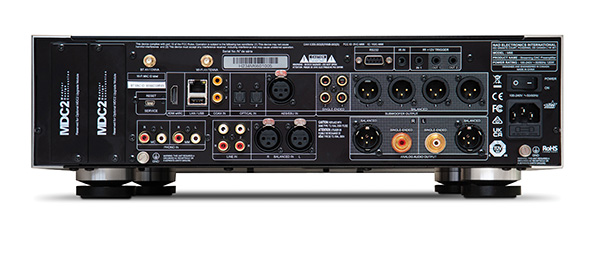 The M66's back panel shows off the range of the M66 as preamplifier/controller. Scanning the connectors from left to right and starting with the digital inputs across the top, we see first two wireless inputs (Bluetooth and Wi-Fi antennas), then HDMI/eARC, LAN, USB, two RCA and two optical (TosLink) S/PDIF, and a single AES3. Below these are the analog inputs: MM Phono and MC Phono on RCA, two pairs of single-ended line inputs on RCA, and one pair of balanced line inputs on XLR. On the right side there are three tiers. The top tier has an RS232 control interface, an IR input, two 12V trigger inputs, and a single 12V trigger output; all the triggers are 1/8" miniplugs. The middle tier has RCA and XLR outputs for four subwoofers. The bottom tier has a pair of RCA and a pair of XLR line-out connectors. To the extreme right is a power block with On/Off switch, an IEC socket, a line fuse, and a grounding post. There are two expansion slots on the extreme left, although it's hard to imagine a pressing need for them.
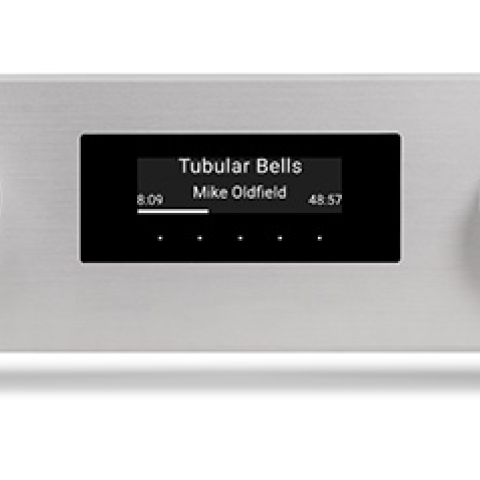
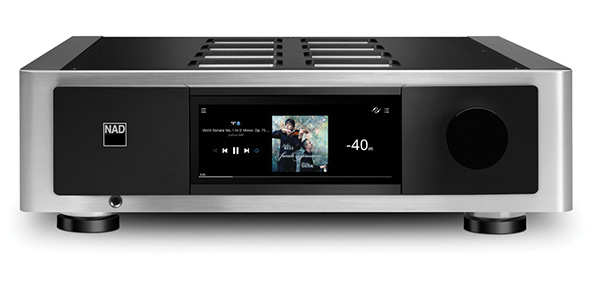
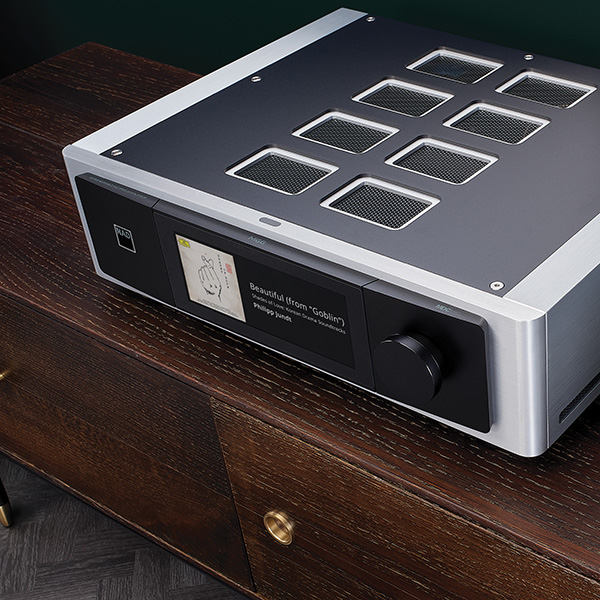 The front view of the M66 is very clean—deceptively so for a device with so much going on. At the front center of the top panel is the On/Standby button; an illuminated NAD badge on the left side of the front panel turns from amber to white when the power is on. Directly below that is a ¼" headphone jack. On the right is a large, smooth, slightly overdamped volume/control knob. Center stage is a 7" full-color touchscreen that displays album art, track/album information, and volume level, and facilitates basic playback controls (Play, Pause, Forward, Back). The large touchscreen also lets you select an input and access the playback queue and settings menus.
This works great if you sit within arm's reach. Fortunately, there are convenient alternatives, including a remote control (footnote 1), though the most practical and comprehensive is the BluOS app, which can run on a computer or any iOS or Android device. The app readily loaded and played my local library and accessed a reasonably wide array of streaming sites. However, it ignored my DSD/DFF tracks (footnote 2).
I did not have time to become fully comfortable with the BluOS system, but apart from the DSD glitch, it seemed to work fine for music playback. My preference for playing music was Roon, but it was easy to use it along with BluOS for settings. With both loaded on all my devices—my main PC/Server, iPhone, and iPad—I could use whichever device was at hand.
I began using the M66 by connecting its line outputs via balanced (XLR) cables to my Benchmark AHB2 amps, which drove my KEF Blade Two Meta loudspeakers. Later, I added a pair of KEF KC92 subwoofers via two of the RCA sub outputs. In addition to the wired LAN, Wi-Fi, and Bluetooth links, I utilized my PC server, which runs both Roon and JRiver, via my Merging Hapi II to make more direct physical connections with both the AES3 digital input and the balanced analog inputs of the M66. For the rare occasions when I needed to spin a silver disc, I plugged my Oppo 103 into the RCA or TosLink inputs. Over the course of the review period, I was able to try many but not all of the M66's physical and network connections.
Straight stereo
The front view of the M66 is very clean—deceptively so for a device with so much going on. At the front center of the top panel is the On/Standby button; an illuminated NAD badge on the left side of the front panel turns from amber to white when the power is on. Directly below that is a ¼" headphone jack. On the right is a large, smooth, slightly overdamped volume/control knob. Center stage is a 7" full-color touchscreen that displays album art, track/album information, and volume level, and facilitates basic playback controls (Play, Pause, Forward, Back). The large touchscreen also lets you select an input and access the playback queue and settings menus.
This works great if you sit within arm's reach. Fortunately, there are convenient alternatives, including a remote control (footnote 1), though the most practical and comprehensive is the BluOS app, which can run on a computer or any iOS or Android device. The app readily loaded and played my local library and accessed a reasonably wide array of streaming sites. However, it ignored my DSD/DFF tracks (footnote 2).
I did not have time to become fully comfortable with the BluOS system, but apart from the DSD glitch, it seemed to work fine for music playback. My preference for playing music was Roon, but it was easy to use it along with BluOS for settings. With both loaded on all my devices—my main PC/Server, iPhone, and iPad—I could use whichever device was at hand.
I began using the M66 by connecting its line outputs via balanced (XLR) cables to my Benchmark AHB2 amps, which drove my KEF Blade Two Meta loudspeakers. Later, I added a pair of KEF KC92 subwoofers via two of the RCA sub outputs. In addition to the wired LAN, Wi-Fi, and Bluetooth links, I utilized my PC server, which runs both Roon and JRiver, via my Merging Hapi II to make more direct physical connections with both the AES3 digital input and the balanced analog inputs of the M66. For the rare occasions when I needed to spin a silver disc, I plugged my Oppo 103 into the RCA or TosLink inputs. Over the course of the review period, I was able to try many but not all of the M66's physical and network connections.
Straight stereo
Before running Dirac or turning on the subwoofers, I turned on the amps and the M66 and ran through a dozen or so familiar recordings just to get a feel for how things worked and to see (or, rather, hear) if there were any audible surprises. I did this in three ways, running the M66 as a Roon Ready endpoint (via a wired network connection), using Roon to control the music and the Hapi for digital conversion, sending the Hapi's analog output to the M66's balanced analog input, and, finally, by using Roon to send output from the Hapi's AES3 output to the M66's AES3 input.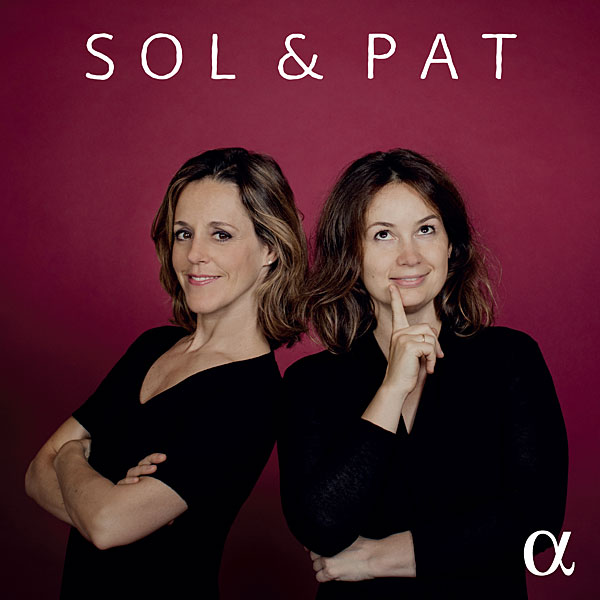 There were no surprises. When I listened to familiar stuff like Ligeti's Six Bagatelles for Wind Quartet (Harmonia Mundi, 905370DI, 24/96 download) and "Tambourine" from Sol & Pat (Alpha Classics Alpha 757, 16/44.1 PCM download), the instruments, their overall balance, and the soundstage was what I heard when running the D/A output of my Merging Hapi direct to the power amps. The sound was clean with notable delineation of instruments and a nice sense of space appropriate to each recording. This tells me that the DAC in the M66 is superb, and the analog path through the M66 is transparent.
This quality of reproduction was best characterized by a recent recording of Dutillieux's Tout un monde lointain... for cello and orchestra (Victor Julien-LaFerriere, Orch. National de France, David Robertson. 16/44.1 PCM download, Alpha Classics Alpha 886). This is a lovely, vigorous performance served by an equally lovely recording in which the solo cello is up front and just a bit left of center stage, while the orchestra is spread wide and distinctly farther back. The subtle beginning, in which the cellist rubs the strings lightly, is barely audible (as it should be) (footnote 3). Within seconds, its presence becomes quite clear. As the orchestra come in to fill the stage, the distinction between cello and orchestra remains, as clear as it would be from, say, Row G.
There were no surprises. When I listened to familiar stuff like Ligeti's Six Bagatelles for Wind Quartet (Harmonia Mundi, 905370DI, 24/96 download) and "Tambourine" from Sol & Pat (Alpha Classics Alpha 757, 16/44.1 PCM download), the instruments, their overall balance, and the soundstage was what I heard when running the D/A output of my Merging Hapi direct to the power amps. The sound was clean with notable delineation of instruments and a nice sense of space appropriate to each recording. This tells me that the DAC in the M66 is superb, and the analog path through the M66 is transparent.
This quality of reproduction was best characterized by a recent recording of Dutillieux's Tout un monde lointain... for cello and orchestra (Victor Julien-LaFerriere, Orch. National de France, David Robertson. 16/44.1 PCM download, Alpha Classics Alpha 886). This is a lovely, vigorous performance served by an equally lovely recording in which the solo cello is up front and just a bit left of center stage, while the orchestra is spread wide and distinctly farther back. The subtle beginning, in which the cellist rubs the strings lightly, is barely audible (as it should be) (footnote 3). Within seconds, its presence becomes quite clear. As the orchestra come in to fill the stage, the distinction between cello and orchestra remains, as clear as it would be from, say, Row G.
 I do not think I have previously had an experience like the one I had with the M66, in which three quite different modes of signal transmission and processing proved equally satisfying. It is important to note that, while the M66 does possess an Analog Direct mode, by default this is defeated and the analog input is digitized at 24/96. In Analog Direct, the signal remains analog from input to output.
You might think it reasonable to make Analog Direct (footnote 4) the default setting, but doing so thwarts all DSP functions for the analog inputs. With Analog Direct selected, you cannot use tone controls, bass management, or Dirac Live with those analog inputs. It also eliminates the L/R balance control.
I expected, reasonably I think, that the loss of such functions would be offset by removal of an audible veil or two resulting from redundant A/D/A conversion (footnote 5), but that expectation wasn't met: Exhaustive A/B comparisons failed to crown a winner. I had the consistent impression that the Analog Direct pathway was a little more relaxed and open, but I could not consistently determine whether it was engaged without a direct A/B comparison. Perhaps it matters that all my sources are digital; if you use analog sources, you may have a different experience.
Some of the functions lost with Analog Direct enabled are significant. I don't care about tone controls or Balance, but the loss of Dirac—which, for one thing, is by far the best way to integrate subwoofers—is regrettable.
Turning to the digital inputs: DDH turns out to be a winner. Clipping due to intersample overs is not a new discovery; its cause and its solutions are well documented (footnote 6). It can coarsen treble details with, eg, cymbals or high-brass partials.
I do not think I have previously had an experience like the one I had with the M66, in which three quite different modes of signal transmission and processing proved equally satisfying. It is important to note that, while the M66 does possess an Analog Direct mode, by default this is defeated and the analog input is digitized at 24/96. In Analog Direct, the signal remains analog from input to output.
You might think it reasonable to make Analog Direct (footnote 4) the default setting, but doing so thwarts all DSP functions for the analog inputs. With Analog Direct selected, you cannot use tone controls, bass management, or Dirac Live with those analog inputs. It also eliminates the L/R balance control.
I expected, reasonably I think, that the loss of such functions would be offset by removal of an audible veil or two resulting from redundant A/D/A conversion (footnote 5), but that expectation wasn't met: Exhaustive A/B comparisons failed to crown a winner. I had the consistent impression that the Analog Direct pathway was a little more relaxed and open, but I could not consistently determine whether it was engaged without a direct A/B comparison. Perhaps it matters that all my sources are digital; if you use analog sources, you may have a different experience.
Some of the functions lost with Analog Direct enabled are significant. I don't care about tone controls or Balance, but the loss of Dirac—which, for one thing, is by far the best way to integrate subwoofers—is regrettable.
Turning to the digital inputs: DDH turns out to be a winner. Clipping due to intersample overs is not a new discovery; its cause and its solutions are well documented (footnote 6). It can coarsen treble details with, eg, cymbals or high-brass partials.
Footnote 1: I have little to say about the remote control. Yes, it can control volume, the brightness of the NAD icon, power on/standby, and mute. It can also pause/resume play and advance track forward or back. There is a potentially useful button which, with each push, steps through the five available Dirac filters and Dirac OFF, but there is no display on the RC or the front panel to indicate the current status. (Great for blind tests!) There are 10 programmable buttons for presets, but there is no way, until programmed, for it to select inputs or to remind the user what each button does.
Footnote 2: BluOS does not play DSD/DFF as downloaded or as ripped from SACDs. Its only option is to create, off line, PCM files for playback. I tried it once and it does work.
Footnote 3: At the time I wrote this review, I had not looked at the score and incorrectly identified the "barely audible" opening sounds. After consulting the score, I found that the sound is made by the very gentle brushing of a cymbal and a snare drum and relistening at a very high level clearly confirmed my error. I also checked out several other recordings and, on most, the brushing was either inaudible, unidentifiable or clear but just too loud! The best were this one and another by Xavier Phillips (cello) and the Seattle Symphony led by Ludovic Morlot (SSM1001, 24/96 5.1 download).
Footnote 4: Analog Direct is individually selectable with phono MM, phono MC, line 1, line 2, and balanced inputs.
Footnote 5: When not in Analog Direct, the input is currently digitized to 24/96 by an ESS Sabre ES9822Pro, a two-channel ADC with impressive specs: DNR of 124dB and 117dB of THD+N!
Footnote 6: See benchmarkmedia.com/blogs/application_notes/intersample-overs-in-cd-recordings.
The M66's back panel shows off the range of the M66 as preamplifier/controller. Scanning the connectors from left to right and starting with the digital inputs across the top, we see first two wireless inputs (Bluetooth and Wi-Fi antennas), then HDMI/eARC, LAN, USB, two RCA and two optical (TosLink) S/PDIF, and a single AES3. Below these are the analog inputs: MM Phono and MC Phono on RCA, two pairs of single-ended line inputs on RCA, and one pair of balanced line inputs on XLR. On the right side there are three tiers. The top tier has an RS232 control interface, an IR input, two 12V trigger inputs, and a single 12V trigger output; all the triggers are 1/8" miniplugs. The middle tier has RCA and XLR outputs for four subwoofers. The bottom tier has a pair of RCA and a pair of XLR line-out connectors. To the extreme right is a power block with On/Off switch, an IEC socket, a line fuse, and a grounding post. There are two expansion slots on the extreme left, although it's hard to imagine a pressing need for them.
The front view of the M66 is very clean—deceptively so for a device with so much going on. At the front center of the top panel is the On/Standby button; an illuminated NAD badge on the left side of the front panel turns from amber to white when the power is on. Directly below that is a ¼" headphone jack. On the right is a large, smooth, slightly overdamped volume/control knob. Center stage is a 7" full-color touchscreen that displays album art, track/album information, and volume level, and facilitates basic playback controls (Play, Pause, Forward, Back). The large touchscreen also lets you select an input and access the playback queue and settings menus.
Before running Dirac or turning on the subwoofers, I turned on the amps and the M66 and ran through a dozen or so familiar recordings just to get a feel for how things worked and to see (or, rather, hear) if there were any audible surprises. I did this in three ways, running the M66 as a Roon Ready endpoint (via a wired network connection), using Roon to control the music and the Hapi for digital conversion, sending the Hapi's analog output to the M66's balanced analog input, and, finally, by using Roon to send output from the Hapi's AES3 output to the M66's AES3 input.
There were no surprises. When I listened to familiar stuff like Ligeti's Six Bagatelles for Wind Quartet (Harmonia Mundi, 905370DI, 24/96 download) and "Tambourine" from Sol & Pat (Alpha Classics Alpha 757, 16/44.1 PCM download), the instruments, their overall balance, and the soundstage was what I heard when running the D/A output of my Merging Hapi direct to the power amps. The sound was clean with notable delineation of instruments and a nice sense of space appropriate to each recording. This tells me that the DAC in the M66 is superb, and the analog path through the M66 is transparent.
This quality of reproduction was best characterized by a recent recording of Dutillieux's Tout un monde lointain... for cello and orchestra (Victor Julien-LaFerriere, Orch. National de France, David Robertson. 16/44.1 PCM download, Alpha Classics Alpha 886). This is a lovely, vigorous performance served by an equally lovely recording in which the solo cello is up front and just a bit left of center stage, while the orchestra is spread wide and distinctly farther back. The subtle beginning, in which the cellist rubs the strings lightly, is barely audible (as it should be) (footnote 3). Within seconds, its presence becomes quite clear. As the orchestra come in to fill the stage, the distinction between cello and orchestra remains, as clear as it would be from, say, Row G.
I do not think I have previously had an experience like the one I had with the M66, in which three quite different modes of signal transmission and processing proved equally satisfying. It is important to note that, while the M66 does possess an Analog Direct mode, by default this is defeated and the analog input is digitized at 24/96. In Analog Direct, the signal remains analog from input to output.
You might think it reasonable to make Analog Direct (footnote 4) the default setting, but doing so thwarts all DSP functions for the analog inputs. With Analog Direct selected, you cannot use tone controls, bass management, or Dirac Live with those analog inputs. It also eliminates the L/R balance control.
I expected, reasonably I think, that the loss of such functions would be offset by removal of an audible veil or two resulting from redundant A/D/A conversion (footnote 5), but that expectation wasn't met: Exhaustive A/B comparisons failed to crown a winner. I had the consistent impression that the Analog Direct pathway was a little more relaxed and open, but I could not consistently determine whether it was engaged without a direct A/B comparison. Perhaps it matters that all my sources are digital; if you use analog sources, you may have a different experience.
Footnote 1: I have little to say about the remote control. Yes, it can control volume, the brightness of the NAD icon, power on/standby, and mute. It can also pause/resume play and advance track forward or back. There is a potentially useful button which, with each push, steps through the five available Dirac filters and Dirac OFF, but there is no display on the RC or the front panel to indicate the current status. (Great for blind tests!) There are 10 programmable buttons for presets, but there is no way, until programmed, for it to select inputs or to remind the user what each button does.