
A bit of history
I have been fascinated with Dirac, the Swedish audio-optimization software company, ever since I noticed the Dirac booth in the back at CEDIA 2010 in Atlanta. It was on the show floor, so this was not a demonstration but a tease, a tantalizing promise of a cure for problematic listening room acoustics using digital filters to adjust loudspeaker response in both the frequency and time domains. Before Dirac, domestic room correction had been limited mostly to frequency-response adjustments, essentially fancy tone controls. The rise of home theater created a need for help managing and integrating multiple speakers and subwoofers. The popular, successful response to this was Audyssey, a system that automatically adjusted channel levels, delays, and frequency response based on microphone measurements made at the listening seat. Dirac's promise was not fulfilled immediately. The first solution they offered was for tuning factory-installed hi-fi systems in luxury automobiles, though they also provided tools used in a few limited-distribution home theater processors, such as the Datasat AP20. Finally, in 2011, Dirac offered the Dirac Research Live Room Correction Suite, which I could run on my PC. It impressed me so much that it spurred me to transition to music playback from files; even in the era of built-in optical drives, disc playback via PC was clumsy. At CES 2014, Dirac's offering was even more provocative. The company demonstrated a prototype of the Unison room-correction system, which "uses all of the speakers in a standard horizontal speaker array as active correction devices for room modes." The demo system, which consisted of a collection of small, unexceptional standmount speakers and a couple of tiny subwoofers, sounded outstanding by any standard. The differences in the on-off comparison were stunning. Unfortunately, Unison was not a consumer product and never became one. What it was was a pointer toward the future.
I have used every version of Dirac beginning with the original iteration of Dirac Room Correction, which lacked support for bass management and treated individual speakers without regard to relationships to the other channels. This evolved to Dirac Bass Management, which implemented main/sub crossovers, and then to Bass Control, which offered a more sophisticated bass-management approach that "optimize[d] both the subwoofers (using a single all-pass filter for the redirected bass) and the individual all-pass filters for the full-range channels, taking into consideration the acoustical interactions among the subs and the groups of speakers," as Dirac (the company) said. I wrote in my review, "the subs disappeared, but the main speakers seemed to have prodigious low-frequency extension and control"
Dirac ART (for Active Room Treatment, footnote 1) builds on both Room Correction—Dirac's foundational product—and Bass Control. ART features full-spectrum, speaker-by-speaker impulse response correction with the addition of MIMO (Multiple-Input and Multiple-Output) technology. It is clearly the grandchild of both the Unison experiments and Dirac's long-term investment in automobile systems. Operating only below 150Hz, it recruits all the main speakers and all the available subwoofers in a cooperative effort to cancel room modes. The full-spectrum signal fed to each speaker and subwoofer is processed for a flat response (or whatever variation you prefer); in addition, a portion of the signal below 150Hz is rerouted to one or more of the other speakers and subs after having been reprocessed to correct and/or extend that channel's in-room reproduction at the listening position(s). Dirac ART has been available for a while on a wide range of AV receivers and processors, but until now it has not been offered as software for computers. Why does that matter? All (or at least many) of those AV-oriented components support audio with limited bandwidth, presumably because they are focused on sounds that accompany moving pictures. That means the audio, even in quite powerful and elevated devices like the StormAudio ISP Evo, is limited to 24/48 and conveyed via lossy compression.
But even if that changes, why must those of us interested in music pay for and be encumbered by video hardware to enjoy lossless, high-resolution sound with state-of-the-art room EQ?
Another reason—perhaps the most obvious—is that streaming has exploded, with the computer as a high-quality, low-cost source. Many of us have long used computers as a music source. We wanted in!
With this release of Dirac ART, all three levels of Dirac Live are available for use on Windows 11 and macOS 11+ devices. Here's the rundown:
01 Room Correction: This is the core optimization technology. It adapts each speaker to your room and corrects for frequency and timing. Dirac says it "delivers richer, clearer sound." It comes with Dirac Live Processor, which runs in the background and applies corrections for all three parts of Dirac Live.
02 Bass Control: This is the subwoofer integration; if you don't use subwoofers, you don't need it. It's an add-on; you can't use it without the Room Correction part. It automates subwoofer setup and minimizes seat-to-seat variation. Dirac says it "eliminates overpowering, boomy bass."
03 Speaker Cooperation: This is the ART part. It, too, is an add-on: 01 Room Correction is the foundation. ART allows the speakers to work together to tame resonances and decay. Dirac says ART "delivers the ultimate immersive sound."
There are good reasons to use more than one subwoofer, but if you want to use Bass Control and ART, each subwoofer must have its own audio channel. Dirac processing tops out at 32/192 PCM, so higher-resolution streams must be downsampled.
Starting Dirac
I used the latter option with Roon and found its sonic performance entirely satisfying, every bit as good as the plug-in. However, the stand-alone approach has two shortcomings. First, it is limited to eight channels, while the plug-in offers up to 16. Second, the stand-alone DLP operates at only one sample rate at a time and does not respond to sample-rate changes in the source stream. Of course you can, at any time, manually change the sample-rate setting inside Dirac, to any supported rate, but this is an annoying inconvenience. To avoid it, I had Roon upsample or downsample all sources and streams to the same fixed rate and kept the DLP at that setting.
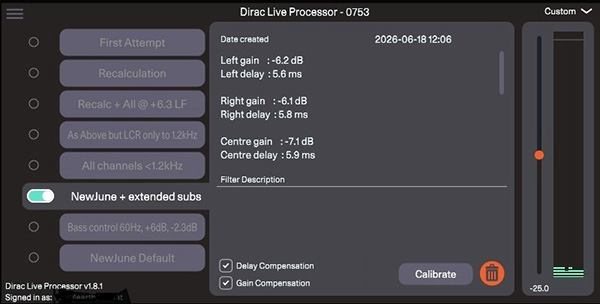
While DLP is always in operation, it stays behind the scenes. Once it's set up, you never need to bother with it except when you need to select a different filter set or compare a filter with bypass.
In contrast, Dirac Live, which is only used for calibration, is very hands-on. Dirac Live supports making a common set of measurements, used for all three Dirac modules. Each set of measurements is specific to a single fixed system and room. The user must decide how high and how low in frequency the correction should go and whether to apply a frequency-response preference curve—anything other than flat. 02 Bass Control adds the facility to configure the crossovers between the subwoofers and the main speakers. ART, however, entirely dispenses with the concept of crossover: Each speaker reproduces its equalized channel output according to its measured capabilities, plus additional signal information to correct the room's modal influence on the other channels; each speaker does its part, assisting the other speakers and helping to tame the room. "From each according to his ability, to each according to his need," as Karl Marx said (footnote 3).
Operationally, this presents an almost overwhelming range of possibilities. Happily, Dirac provides useful, step-by-step instructions within each module and detailed documentation online. If you need further guidance, almost everything I wrote in my earlier reviews still applies, despite Dirac's improved user interface.
If you're just starting out with Dirac, you should do a complete set of measurements in 01 Room Correction. Add 02 Bass Control if you're running one or more subwoofers. Save the default correction and listen to it. Come back later to adjust the target response curve and the correction range for individual speakers, if you think it's necessary. Iterate. Experiment. Listen and repeat until the sound stops getting better or until you're tired and satisfied.
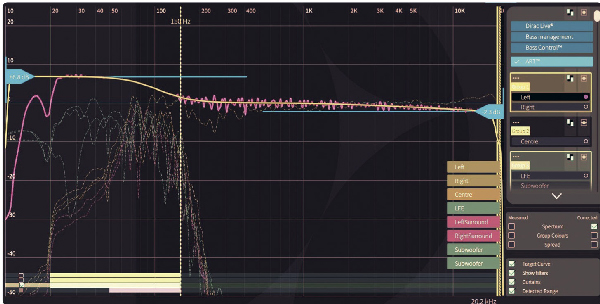
You can click on ART in Dirac Live at any time with no need to do a recalibration unless something acoustically significant has been changed in your system or room. However, ART processing is more complex because, by default, every speaker or subwoofer with usable output below 150Hz (in my case, that's all of them) is recruited to support the others, extending their low-frequency response and correcting their impulse response. There is no longer any use for a bass management crossover frequency because each main speaker operates as low as it can; the other bass-capable speakers and subs fill in the rest.
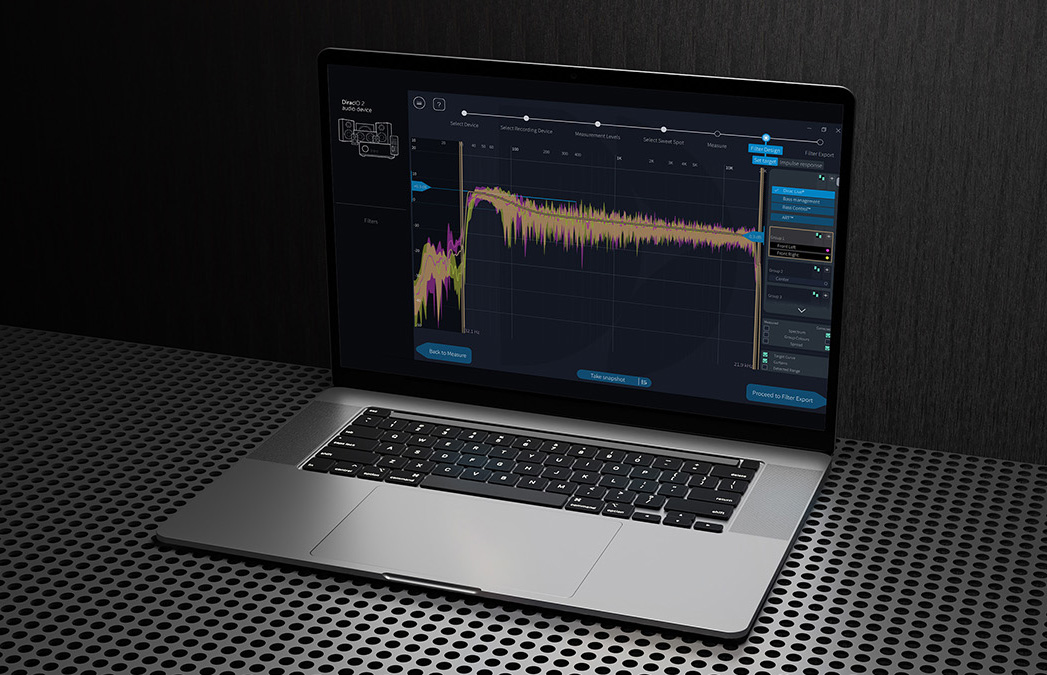
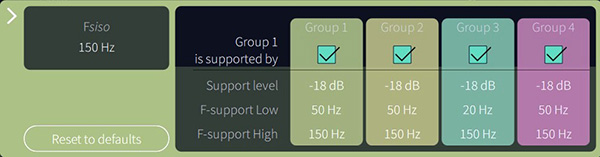
In my screenshot (above), all the speakers are listed in groups on the right. You can regroup the speakers or break up groups and deal with speakers independently. New with ART is a stack of bars and checkboxes on the lower left. Each bar represents the frequencies over which each of the other speakers or groups of speakers will contribute support to the displayed speaker(s). Here, for my left front speaker, the bars are Left and Right (mutual support); Center; LFE/Subs; and Left and Right Surround (LS/RS). Clicking on the triple dots for any speaker or group pops up an explicit menu to add or delete individual support dependencies, vary the amplitude of their support, or modify the upper and lower frequency limits of their active support.
What I settled on, at least for the time being, differs a little from ART's default settings. First, although ART's operations are generally limited to 20Hz–150Hz, I clicked the little box for the LFE/Sub group to extend its support range for all my L/R speakers to 10Hz (footnote 4). I also extended the in-channel frequency response for my left, center, and right speakers and subs down to 20Hz, but I left the LS and RS speakers at 50Hz. This was my tweak after listening to the default, which had every main speaker rolled off at 50Hz, and deciding there was a subtle lessening of impact and granularity on some really low organ pedal tones. The default bass lift and treble rolloff seemed just right.
The range of options is extensive, and that can be challenging, but you can have eight active filter settings on the DLP, facilitating instant comparisons. You can store as many as you want on your computer. Dirac provides some guidance (footnote 5) to get you going. You can also find recommendations on many websites. Be careful, though, because these are often targeted to home theater—to enhancing center channel dialog intelligibility, for example—and not the parameters prioritized for music. I advise new users to click and accept the default ART settings and, as with Room Correction or Bass Control, listen for a while before trying to improve it.
After I renovated my apartment, I knew there was a problem as soon as I set up my listening room. The room's dimensions had barely changed, but the loudspeakers and subwoofers were new, and the recently adopted KEF Blade II Metas, which have side-mounted woofers and rear ports, interact with the front/side walls entirely differently than did my Revel Studio2s, which had front-mounted woofers and bottom ports. The KEFs sound wonderful, but finding the ideal location for the left and right Blades was complicated by the speakers' interactions with the front and side walls, mostly below 150Hz. The sound was good, but something just wasn't right. I kept experimenting but never settled in. Fortunately, ART targets just that range. Recordings that had disappointed me before ART are now revealed to have been victims of corrupting room influence. Striking examples are some recordings produced by Jim Anderson and Ulrike Schwartz, recordings introduced to me in their Brooklyn studio. One example is Old Friends by The Secret Trio (5.1, 24/352.8); another is Patricia Barber's Clique (5.1, DSD256), both downloaded from NativeDSD. Previously, when I played these files at home, they seemed a bit more spacious than I'd experienced in the studio, but the bass was thick and imprecise and lacked impact. With ART, the bass was tight and powerful. Everything else was still spacious but somehow more expansive—and quite thrilling. Although ART targets a range in the bass, its changes manifest all across the audible range, especially in the midrange and lower treble. I was surprised by the improvements ART wrought on recordings that impressed me in the past. Late last year, I wrote about a recording of Rachmaninoff 's All-Night Vigil, Op.37 (1915) with the PaTRAM Institute Male Choir conducted by Ekaterina Antonenko (24/96 download, Chandos CHSA 5349). I wrote about how impressed I was by the octavist, Alexis V. Lukianov, whose voice extends down to 60Hz. However, at the time it was only in his solo turns, at the beginning of the Vigil and the trailing end of a few sections, that I appreciated his contributions. Listening with ART, I felt securely embedded in the ambience of the Church of the Ascension (Jerusalem), immersed in the rich texture of the all-male choir. Throughout I was almost constantly aware of the contributions of the octavists and other voices that create that texture.
Leonard Slatkin's 2004 multichannel recording of Samuel Barber's opera Vanessa (SACD, Chandos CHSA 5032) is a continuing pleasure, both for the lovely performances and the warm but distant sound. Turning it up drew me closer but also made it seem distended and imprecise. Recently I added a new Vanessa, from Gianandrea Noseda and the National Symphony Orchestra (DSD64 download, NSO NSO0023). The performance and singing is excellent—bolder than on Chandos—but the soundstage was shallow. When I turned it up, it became brash. When I turned it down, it lost color and detail.
I was surprised by the improvements ART wrought on recordings that impressed me in the past. Late last year, I wrote about a recording of Rachmaninoff 's All-Night Vigil, Op.37 (1915) with the PaTRAM Institute Male Choir conducted by Ekaterina Antonenko (24/96 download, Chandos CHSA 5349). I wrote about how impressed I was by the octavist, Alexis V. Lukianov, whose voice extends down to 60Hz. However, at the time it was only in his solo turns, at the beginning of the Vigil and the trailing end of a few sections, that I appreciated his contributions. Listening with ART, I felt securely embedded in the ambience of the Church of the Ascension (Jerusalem), immersed in the rich texture of the all-male choir. Throughout I was almost constantly aware of the contributions of the octavists and other voices that create that texture.
Leonard Slatkin's 2004 multichannel recording of Samuel Barber's opera Vanessa (SACD, Chandos CHSA 5032) is a continuing pleasure, both for the lovely performances and the warm but distant sound. Turning it up drew me closer but also made it seem distended and imprecise. Recently I added a new Vanessa, from Gianandrea Noseda and the National Symphony Orchestra (DSD64 download, NSO NSO0023). The performance and singing is excellent—bolder than on Chandos—but the soundstage was shallow. When I turned it up, it became brash. When I turned it down, it lost color and detail.
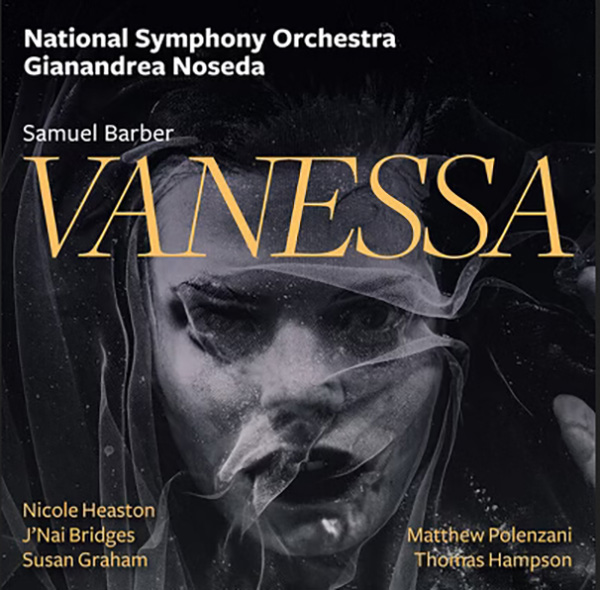 With ART, both color and detail were markedly improved. The Noseda was no longer aggressive but tight and powerful right from the orchestral introduction. The voices were clear and balanced, human at all listening levels. Both the sound and the performance were dynamic. The Slatkin version shed its woolly ambience, which I now understand was my room's contribution. It gained presence and robustness, especially with the gain turned up. The voices were simply lovely.
Still, although both were rendered better with ART, they remained as distinct—as different from each other—as ever. The Slatkin had a wider, deeper soundstage to begin with; Chandos does some of its best work at the Barbican, capturing just enough warmth while preserving intimate detail. With ART, the Noseda no longer sounded like a studio job, which it is not. Now it was open, dramatic, lively. Voices and orchestra sounded free and uncongested. Each recording seemed presented optimally, consistent with the mood of its performance. With ART, I got the best experience of each.
With ART, both color and detail were markedly improved. The Noseda was no longer aggressive but tight and powerful right from the orchestral introduction. The voices were clear and balanced, human at all listening levels. Both the sound and the performance were dynamic. The Slatkin version shed its woolly ambience, which I now understand was my room's contribution. It gained presence and robustness, especially with the gain turned up. The voices were simply lovely.
Still, although both were rendered better with ART, they remained as distinct—as different from each other—as ever. The Slatkin had a wider, deeper soundstage to begin with; Chandos does some of its best work at the Barbican, capturing just enough warmth while preserving intimate detail. With ART, the Noseda no longer sounded like a studio job, which it is not. Now it was open, dramatic, lively. Voices and orchestra sounded free and uncongested. Each recording seemed presented optimally, consistent with the mood of its performance. With ART, I got the best experience of each.
 One of my all-time go-to delights is Bob Belden's 12-part jazz-noir symphonic suite, Black Dahlia (DSD64 rip from SACD, Blue Note Records 72435417452). I wrote about its virtues in my review of the KEF Blade Two Meta but, with ART, it is so much more. The opening chord is stunning and leaves in its wake a soundstage many times larger than before, and every instrument of the large, bluesy, Latin-inspired jazz orchestra, solo or joined, was tonally accurate, precisely delineated, and positioned right there in the expanded space. In that Blade review, I described Black Dahlia as immersive and transporting. With ART it was simply awesome.
In principle, the more independent speakers and subs you have, the more effective ART is, but it does work with 2.0 (stereo) or 2.1 (sub-sat) systems (footnote 6). In fact, stereo playback on my three-subwoofer (5.3) system was dramatically transformed. I randomly sampled many favorite tracks and heard changes much like I have described above, especially at the lower frequencies, where ART does its work. Even with only the left-front and right-front speakers playing in stereo, the soundstage was wider and more continuously detailed than I had experienced previously with just the first two Dirac modules. Listening in stereo made explicit another benefit of Dirac ART. Many of us have had the experience that turning up the volume past a certain point can excite a certain room mode, by, for example, a single bass note, to a point beyond what's pleasing. Sometimes it seems that all the bass blooms out of proportion when we exceed some level. That's the room, not the music. We reflexively dial it back.
With ART, that doesn't happen anymore, as I can demonstrate with two very familiar tracks that are famous for their bass energy: "Yulunga" from Dead Can Dance's Into the Labyrinth (DSD rip from SACD, 4AD SAD2711) and Béla Fleck and the Flecktones' Flight of the Cosmic Hippo (CD rip, Warner Bros. Records 9 26562-2). In the former, focus on the whole span of the low-to-midbass percussion and plucked strings. In the latter, follow that Stygian bass melody. Previously, when I turned up the volume past a certain point, the bass became louder but also amorphous as it overloaded the room, the music, and my ears. Using ART, when I turned up the wick, none of that happened because its correction of modal behavior tracks with changing volume. Consequently it's possible to play all your music louder than ever, limited only by your own tolerance or unhappy neighbors.
In my random ramble through my library testing Dirac ART against my memory of favorite tracks, the cover art of Tracy Chapman's 1995 album, New Beginning, caught my eye. Of course I had to play "Give Me One Reason" (CD rip, Elektra 61850-2). I had heard it before, many times, but not like this. It was as if the opening bass and guitar were in the room with me, close—except that it was not my room. When Chapman's voice, warm and vital, appeared to their right, it confirmed our common presence in this other space. Percussion had snap. A quick bypass of Dirac was jarring, its restoration relief and pleasure. I had the feeling that, finally, everything was just right.
Is ART flawless?
Once it is up and running, I'd say yes, but accomplishing that takes a fair bit of effort, and there is no provision for making on-the-fly adjustments. For all of Dirac's voluminous documentation, I'd like to see some built-in tools to help fine-tune settings.
Dirac, with or without ART, will only operate in PCM at bit rates up to 32/192. Sources with higher bit rates must be downsampled. To me this is not concerning; 32/192 is sufficient, and what Dirac ART does for my listening pleasure far exceeds any benefit that would be gained by a further increase in this already generous resolution limit.
 Conclusions
I've been tracking ART through nearly two years of beta versions and using earlier versions for a decade. With each step, its value has become clearer. ART for PC and Mac is a giant step up in power and effectiveness. ART cleans up the congestion imposed by listening room acoustics in the low bass and midbass, for added transparency, definition, power, and low-end extension. Moreover, the clarification in the bass achieved below 150Hz complements changes made by the base (not bass) module, Dirac Room Correction. Together, the software suite's amelioration of balance issues and elimination of frequency- and time-domain anomalies lead to a qualitative expansion of the soundstage. Dirac ART has made everything I have played, regardless of genre, resolution, or format, more enjoyable.
Footnote 1: See shorturl.at/T4560. Footnote 2: "Active Room Treatment - Setup Guide" is a guide for ART specifically, but the measurement portion is the same as for Room Correction, Bass Management, and Bass Control. See mavenoidfiles.com/i5e0kv3g8vm25e12rqm7rv6tu0qir5tlqh84.
Footnote 3: Karl Marx, Critique of the Gotha Program, part I. See marxists.org/archive/marx/works/1875/gotha/ch01.htm.
Footnote 4: See "ART Technical Guide - Infra bass bypass" at helpdesk.dirac.com/en/dirac-art/How-to-Infra-bass-bypass-in-ART-ff94.
Footnote 5: See "ART Technical Guide - Channel group and support settings" at helpdesk.dirac.com/en/dirac-art/How-to-ART-Channel-Group-and-Support-Settings-8382.
Footnote 6: See "ART Use Case Definition and Setup Guidelines" at dirac.com/resources.
I have been fascinated with Dirac, the Swedish audio-optimization software company, ever since I noticed the Dirac booth in the back at CEDIA 2010 in Atlanta. It was on the show floor, so this was not a demonstration but a tease, a tantalizing promise of a cure for problematic listening room acoustics using digital filters to adjust loudspeaker response in both the frequency and time domains. Before Dirac, domestic room correction had been limited mostly to frequency-response adjustments, essentially fancy tone controls. The rise of home theater created a need for help managing and integrating multiple speakers and subwoofers. The popular, successful response to this was Audyssey, a system that automatically adjusted channel levels, delays, and frequency response based on microphone measurements made at the listening seat. Dirac's promise was not fulfilled immediately. The first solution they offered was for tuning factory-installed hi-fi systems in luxury automobiles, though they also provided tools used in a few limited-distribution home theater processors, such as the Datasat AP20. Finally, in 2011, Dirac offered the Dirac Research Live Room Correction Suite, which I could run on my PC. It impressed me so much that it spurred me to transition to music playback from files; even in the era of built-in optical drives, disc playback via PC was clumsy. At CES 2014, Dirac's offering was even more provocative. The company demonstrated a prototype of the Unison room-correction system, which "uses all of the speakers in a standard horizontal speaker array as active correction devices for room modes." The demo system, which consisted of a collection of small, unexceptional standmount speakers and a couple of tiny subwoofers, sounded outstanding by any standard. The differences in the on-off comparison were stunning. Unfortunately, Unison was not a consumer product and never became one. What it was was a pointer toward the future.
"Dirac Live Processor" menu showing available filters and their properties. Also provides access to channel configurations and to Dirac Live calibration.
Dirac todayDirac ART (for Active Room Treatment, footnote 1) builds on both Room Correction—Dirac's foundational product—and Bass Control. ART features full-spectrum, speaker-by-speaker impulse response correction with the addition of MIMO (Multiple-Input and Multiple-Output) technology. It is clearly the grandchild of both the Unison experiments and Dirac's long-term investment in automobile systems. Operating only below 150Hz, it recruits all the main speakers and all the available subwoofers in a cooperative effort to cancel room modes. The full-spectrum signal fed to each speaker and subwoofer is processed for a flat response (or whatever variation you prefer); in addition, a portion of the signal below 150Hz is rerouted to one or more of the other speakers and subs after having been reprocessed to correct and/or extend that channel's in-room reproduction at the listening position(s). Dirac ART has been available for a while on a wide range of AV receivers and processors, but until now it has not been offered as software for computers. Why does that matter? All (or at least many) of those AV-oriented components support audio with limited bandwidth, presumably because they are focused on sounds that accompany moving pictures. That means the audio, even in quite powerful and elevated devices like the StormAudio ISP Evo, is limited to 24/48 and conveyed via lossy compression.
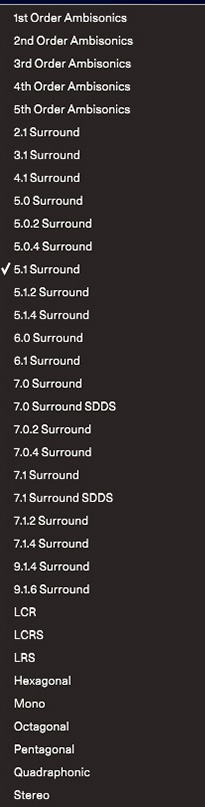
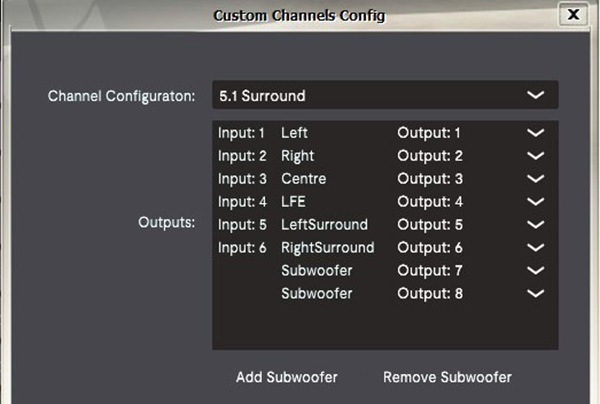
A listing of all the standard channel configurations that Dirac supports.
After you've paid, you download two program modules, "Dirac Live Processor" (DLP) and "Dirac Live" (footnote 2) DLP applies the correction filters, so it must be installed into the playback path in one of two ways. I installed it as a plug-in to a compatible music player; I use it as a VST3 plug-in in JRiver, but Dirac also provides AU, AAX, and VST variations, which cover any PC, Mac, or DAW that supports plug-ins.
For music players that don't use plug-ins, Dirac offers DLP as a stand-alone module. It acts as a virtual soundcard and becomes the computer's default output device. Stand-alone DLP directs its output to any available target device, such as a DAC. Configured this way, Dirac ART will process all music on the PC or Mac, including from any installed music-streaming apps.
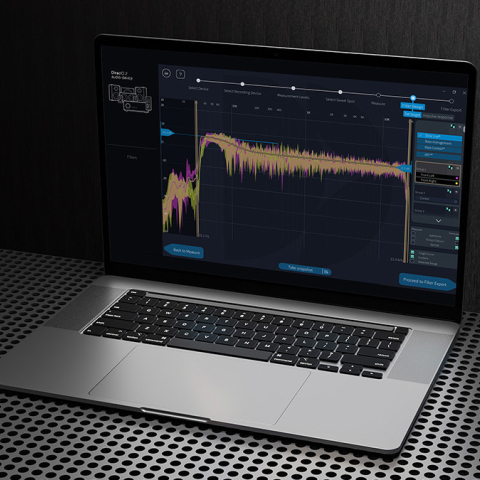
The filter-creation page of "Dirac Processor" showing available speakers/groups on the right and, in the main window, the measured response of my left front speaker, the target curve, and the resulting response. Bars on lower left indicate the support from other speakers/subs, and their individual contributions are represented by the fine dashed graph traces.
The art of ARTYou can click on ART in Dirac Live at any time with no need to do a recalibration unless something acoustically significant has been changed in your system or room. However, ART processing is more complex because, by default, every speaker or subwoofer with usable output below 150Hz (in my case, that's all of them) is recruited to support the others, extending their low-frequency response and correcting their impulse response. There is no longer any use for a bass management crossover frequency because each main speaker operates as low as it can; the other bass-capable speakers and subs fill in the rest.
Pop-up from the filter creation page with detailed and editable parameters of a speaker's support.
How I became an ART loverAfter I renovated my apartment, I knew there was a problem as soon as I set up my listening room. The room's dimensions had barely changed, but the loudspeakers and subwoofers were new, and the recently adopted KEF Blade II Metas, which have side-mounted woofers and rear ports, interact with the front/side walls entirely differently than did my Revel Studio2s, which had front-mounted woofers and bottom ports. The KEFs sound wonderful, but finding the ideal location for the left and right Blades was complicated by the speakers' interactions with the front and side walls, mostly below 150Hz. The sound was good, but something just wasn't right. I kept experimenting but never settled in. Fortunately, ART targets just that range. Recordings that had disappointed me before ART are now revealed to have been victims of corrupting room influence. Striking examples are some recordings produced by Jim Anderson and Ulrike Schwartz, recordings introduced to me in their Brooklyn studio. One example is Old Friends by The Secret Trio (5.1, 24/352.8); another is Patricia Barber's Clique (5.1, DSD256), both downloaded from NativeDSD. Previously, when I played these files at home, they seemed a bit more spacious than I'd experienced in the studio, but the bass was thick and imprecise and lacked impact. With ART, the bass was tight and powerful. Everything else was still spacious but somehow more expansive—and quite thrilling. Although ART targets a range in the bass, its changes manifest all across the audible range, especially in the midrange and lower treble.
I was surprised by the improvements ART wrought on recordings that impressed me in the past. Late last year, I wrote about a recording of Rachmaninoff 's All-Night Vigil, Op.37 (1915) with the PaTRAM Institute Male Choir conducted by Ekaterina Antonenko (24/96 download, Chandos CHSA 5349). I wrote about how impressed I was by the octavist, Alexis V. Lukianov, whose voice extends down to 60Hz. However, at the time it was only in his solo turns, at the beginning of the Vigil and the trailing end of a few sections, that I appreciated his contributions. Listening with ART, I felt securely embedded in the ambience of the Church of the Ascension (Jerusalem), immersed in the rich texture of the all-male choir. Throughout I was almost constantly aware of the contributions of the octavists and other voices that create that texture.
With ART, both color and detail were markedly improved. The Noseda was no longer aggressive but tight and powerful right from the orchestral introduction. The voices were clear and balanced, human at all listening levels. Both the sound and the performance were dynamic. The Slatkin version shed its woolly ambience, which I now understand was my room's contribution. It gained presence and robustness, especially with the gain turned up. The voices were simply lovely.
Still, although both were rendered better with ART, they remained as distinct—as different from each other—as ever. The Slatkin had a wider, deeper soundstage to begin with; Chandos does some of its best work at the Barbican, capturing just enough warmth while preserving intimate detail. With ART, the Noseda no longer sounded like a studio job, which it is not. Now it was open, dramatic, lively. Voices and orchestra sounded free and uncongested. Each recording seemed presented optimally, consistent with the mood of its performance. With ART, I got the best experience of each.
One of my all-time go-to delights is Bob Belden's 12-part jazz-noir symphonic suite, Black Dahlia (DSD64 rip from SACD, Blue Note Records 72435417452). I wrote about its virtues in my review of the KEF Blade Two Meta but, with ART, it is so much more. The opening chord is stunning and leaves in its wake a soundstage many times larger than before, and every instrument of the large, bluesy, Latin-inspired jazz orchestra, solo or joined, was tonally accurate, precisely delineated, and positioned right there in the expanded space. In that Blade review, I described Black Dahlia as immersive and transporting. With ART it was simply awesome.
An example of how to create a nonstandard channel configuration for Dirac.
Does it work in stereo?In principle, the more independent speakers and subs you have, the more effective ART is, but it does work with 2.0 (stereo) or 2.1 (sub-sat) systems (footnote 6). In fact, stereo playback on my three-subwoofer (5.3) system was dramatically transformed. I randomly sampled many favorite tracks and heard changes much like I have described above, especially at the lower frequencies, where ART does its work. Even with only the left-front and right-front speakers playing in stereo, the soundstage was wider and more continuously detailed than I had experienced previously with just the first two Dirac modules. Listening in stereo made explicit another benefit of Dirac ART. Many of us have had the experience that turning up the volume past a certain point can excite a certain room mode, by, for example, a single bass note, to a point beyond what's pleasing. Sometimes it seems that all the bass blooms out of proportion when we exceed some level. That's the room, not the music. We reflexively dial it back.
Once it is up and running, I'd say yes, but accomplishing that takes a fair bit of effort, and there is no provision for making on-the-fly adjustments. For all of Dirac's voluminous documentation, I'd like to see some built-in tools to help fine-tune settings.
ConclusionsI've been tracking ART through nearly two years of beta versions and using earlier versions for a decade. With each step, its value has become clearer. ART for PC and Mac is a giant step up in power and effectiveness. ART cleans up the congestion imposed by listening room acoustics in the low bass and midbass, for added transparency, definition, power, and low-end extension. Moreover, the clarification in the bass achieved below 150Hz complements changes made by the base (not bass) module, Dirac Room Correction. Together, the software suite's amelioration of balance issues and elimination of frequency- and time-domain anomalies lead to a qualitative expansion of the soundstage. Dirac ART has made everything I have played, regardless of genre, resolution, or format, more enjoyable.
Footnote 1: See shorturl.at/T4560. Footnote 2: "Active Room Treatment - Setup Guide" is a guide for ART specifically, but the measurement portion is the same as for Room Correction, Bass Management, and Bass Control. See mavenoidfiles.com/i5e0kv3g8vm25e12rqm7rv6tu0qir5tlqh84.