
"Physical discs are so 20th century," I wrote back in 2006, when I began experimenting with using, in my high-end rig, a computer as a legitimate source of music. These days I rarely pop a disc into my Ayre Acoustics C-5xeMP disc player, unless it's an SACD I want to hear, or a CD I haven't yet ripped into my library. But many audiophiles, even if attracted to the idea of using a file-based system as a primary music source, do not want a computer in their listening rooms. Nor do they want to be bothered by the fact that a computer demands too intimate a relationship with its user.
For such folks, a number of high-end audio companies now offer turnkey, one-box solutions. Larry Greenhill has written about Bryston's impressive BDP-1 and BDP-2 digital audio players; in October 2013 I reviewed Marantz's no-holds-barred Reference NA-11S1 network player; and elsewhere in this issue, Kalman Rubinson enthuses over the Sony HAP-Z1ES. But for the past few months I've been living with a file-playing system from NAD's top-line Masters Series, the M50 Digital Music Player, which costs $2499 and was premiered at the 2013 Consumer Electronics Show.
Inside the box: M50
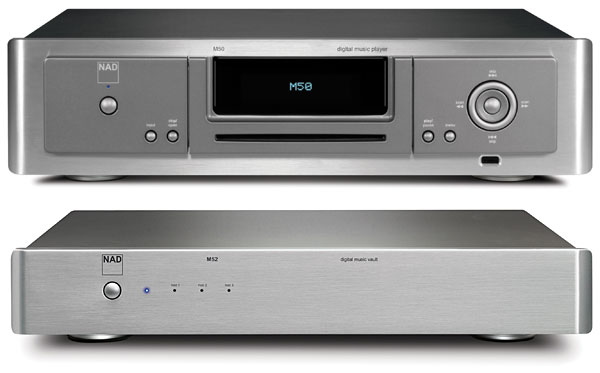
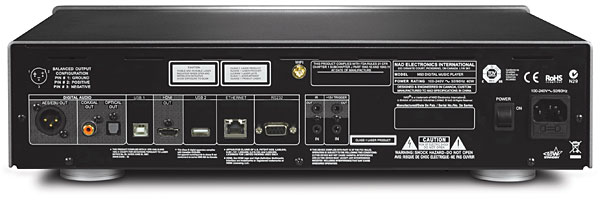
NAD refers to the Masters Series M50 as a "software-defined product." It will play files with bit depths of 16 or 24, and with sample rates up to 192kHz. Like the Brystons, the M50 has only digital outputs, but includes HDMI as well as AES/EBU, and optical and coaxial S/PDIF. Unlike the Sony but like the Marantz, the M50 has no internal storage, but can be used with an external, Linux-formatted USB drive. It also has Ethernet and WiFi connectivity, and can even be configured to act as its own WiFi hotspot, for control by a tablet.
NAD promotes the M50 as "computer audio without the computer." Internally, however, the M50 is indeed based on a computer: a 32-bit, ARM Cortex-A8 processor running Linux and with 248MB of internal memory. But externally, the M50 looks like an attractive high-end CD player—it even has a slot mechanism on the front panel, below its blue fluorescent display.
 Greg Stidsen, NAD's Director, Technology and Product Planning, told me that they started working on the M50 project in 2008. Rather than use a one-size-fits-all OEM file-playing system like uPnP/DLNA, they decided to go it alone, taking what Stidsen described as "a true high-end approach."
At the time this review was prepared, the M50 supported streaming from Rdio, Slacker, TuneIn, and WiMP (Norway), with hi-rez downloads available from Qobuz (France) and HighResAudio (Germany). Stidsen told me that by the time this issue appears on the newsstands, they expect to have Deezer, Juke, and HDtracks support. "With HDtracks, HighResAudio, and Qobuz," he emphasized, "NAD is supporting direct download of purchased high-resolution files to the M50/M52, bypassing the computer completely. This is our vision for this product: to make it simple to purchase, store, and enjoy Studio Master recordings without the complexity and compromise of computer audio."
Inside the box: M52
Greg Stidsen, NAD's Director, Technology and Product Planning, told me that they started working on the M50 project in 2008. Rather than use a one-size-fits-all OEM file-playing system like uPnP/DLNA, they decided to go it alone, taking what Stidsen described as "a true high-end approach."
At the time this review was prepared, the M50 supported streaming from Rdio, Slacker, TuneIn, and WiMP (Norway), with hi-rez downloads available from Qobuz (France) and HighResAudio (Germany). Stidsen told me that by the time this issue appears on the newsstands, they expect to have Deezer, Juke, and HDtracks support. "With HDtracks, HighResAudio, and Qobuz," he emphasized, "NAD is supporting direct download of purchased high-resolution files to the M50/M52, bypassing the computer completely. This is our vision for this product: to make it simple to purchase, store, and enjoy Studio Master recordings without the complexity and compromise of computer audio."
Inside the box: M52
As well as network-attached storage (NAS), the M50 can be used with any drive plugged into its rear-panel USB port. For this review, however, NAD sent along the Masters Series M52 Digital Music Vault ($1999). This connects to the M50 via USB and appears to use proprietary formatting—when I connected it directly to my Mac mini, it wasn't recognized. But when the M52 is plugged into the M50 and turned on, three LEDs on the M52's front panel glow first red, then blue as each of the drives becomes ready.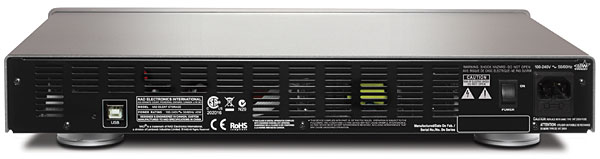 "Each of the drives?" Yes—while the M52 offers two terabytes of storage, it actually uses three separate hard drives in a RAID 5 array. RAID stands for "redundant array of independent disks," the idea being that, rather than multiple drives being used to store more data, the same data are written to all of the drives, along with error checking data: If one fails, the data can still be recovered. RAID 5 offers a powerful safety margin, but its downside is that it requires at least three drives: the M52's 2TB storage actually requires three 1TB drives.
I went online to research hard-drive prices. Tiger Direct sells RAID-compatible drive bays for $259–$368, and three 2TB drives for between $89 and $129 each, not including S&H. In theory, you could brew up your own 2TB RAID 5 array for $600–$800. But that would involve the user and computer getting involved in that relationship thing again. The M52 has no fans, runs dead quiet, and visually matches the M50 and NAD's Master Series M51 Direct Digital DAC. In that context, $1999 seems an appropriate price for the M52.
There's an app for that
"Each of the drives?" Yes—while the M52 offers two terabytes of storage, it actually uses three separate hard drives in a RAID 5 array. RAID stands for "redundant array of independent disks," the idea being that, rather than multiple drives being used to store more data, the same data are written to all of the drives, along with error checking data: If one fails, the data can still be recovered. RAID 5 offers a powerful safety margin, but its downside is that it requires at least three drives: the M52's 2TB storage actually requires three 1TB drives.
I went online to research hard-drive prices. Tiger Direct sells RAID-compatible drive bays for $259–$368, and three 2TB drives for between $89 and $129 each, not including S&H. In theory, you could brew up your own 2TB RAID 5 array for $600–$800. But that would involve the user and computer getting involved in that relationship thing again. The M52 has no fans, runs dead quiet, and visually matches the M50 and NAD's Master Series M51 Direct Digital DAC. In that context, $1999 seems an appropriate price for the M52.
There's an app for that
While the M50 can be operated from its front-panel controls or the supplied remote, the easiest way is to use the NAD Remote app for Android or iOS devices. I downloaded the app (v1.6.1) from the Apple App Store and loaded it onto my iPad 2. The app displays all the music files that can be played with the M50 (see screenshots), and also allows the M51's volume to be controlled. However, an RS-232 connection between the M50 and M51 is required for the latter to function. The app is also compatible with NAD's and PSB's sister brand Blusound components (review forthcoming).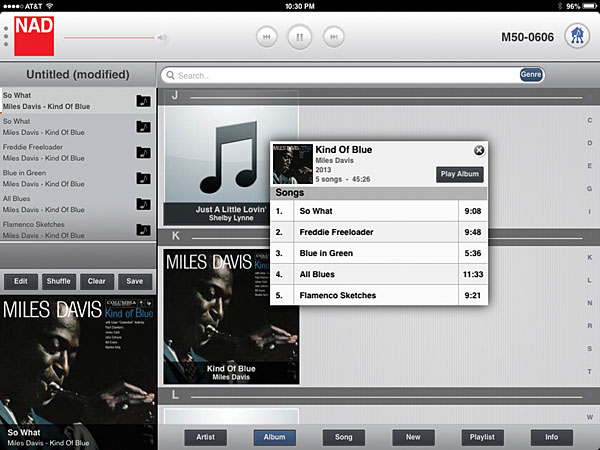
Once the M50 had been connected to my router with an Ethernet cable, it was recognized by our domestic network as "M50-606" and, as have the other network-connected players I've tried, it updated its firmware via the Internet. I turned on my iPad, the NAD app recognized the M50, and that—after I'd used the app to index the music files on the M52—was that.
A ripping good time
The M50's CD drive can be used both to rip and play CDs. (When a disc is inserted, the app lets you select a default action or be prompted which you prefer; if the M50 is used without an active M52 or USB mass-storage device, a CD will automatically be played.) It took the M50 10:29 to rip a CD lasting 60:59, a playing speed of just under 6x, and about twice that to transcode the ripped files to FLAC, which I'd selected as the default format. (WAV and 320kbps MP3 are also offered; the rips are always made first to temporary WAV files in the M52's Rips folder, then transcoded to the desired format and moved to the Music folder.) The M50 retrieves the metadata and album art from the Internet when the disc is inserted and the disc is ejected at the end of the rip. Rips are automatically indexed by the M50; if you select a song, then press Info on the app screen, a window opens with the artist and album info downloaded from Last.FM.com. NAD had provided a small number of files with the M52, but rather than re-rip CDs that were already in my iTunes library, I copied them over the network from my Mac mini's drive. This was as easy as mounting the M50-606 icon on the Mac's desktop, dragging'n'dropping the files from the Mac's iTunes Media folder to the Shared-Music folder on the M52, and reindexing the songs with the iOS app. I transferred both CD-sourced files and hi-rez files with sample rates up to 192kHz—and, for grins, a couple of DFF-formatted DSD64 files. Though the DSD64 files could be seen residing on the M52 via the network, the iOS app didn't recognize them as being playable. Given the M50's nature as a "software-defined product," I would imagine that DSD playback might well be the subject of a future firmware upgrade. However, if that were to happen, I suspect that the DSD data could be output only via the M50's HDMI port. More important for those of us who keep our music files in iTunes, as well as as its "native" formats—WAV, FLAC, MP3—the M51 will play all proprietary file formats used by iTunes: AIFF, ALAC, AAC, even purchased AAC.
NAD refers to the Masters Series M50 as a "software-defined product." It will play files with bit depths of 16 or 24, and with sample rates up to 192kHz. Like the Brystons, the M50 has only digital outputs, but includes HDMI as well as AES/EBU, and optical and coaxial S/PDIF. Unlike the Sony but like the Marantz, the M50 has no internal storage, but can be used with an external, Linux-formatted USB drive. It also has Ethernet and WiFi connectivity, and can even be configured to act as its own WiFi hotspot, for control by a tablet.
Greg Stidsen, NAD's Director, Technology and Product Planning, told me that they started working on the M50 project in 2008. Rather than use a one-size-fits-all OEM file-playing system like uPnP/DLNA, they decided to go it alone, taking what Stidsen described as "a true high-end approach."
At the time this review was prepared, the M50 supported streaming from Rdio, Slacker, TuneIn, and WiMP (Norway), with hi-rez downloads available from Qobuz (France) and HighResAudio (Germany). Stidsen told me that by the time this issue appears on the newsstands, they expect to have Deezer, Juke, and HDtracks support. "With HDtracks, HighResAudio, and Qobuz," he emphasized, "NAD is supporting direct download of purchased high-resolution files to the M50/M52, bypassing the computer completely. This is our vision for this product: to make it simple to purchase, store, and enjoy Studio Master recordings without the complexity and compromise of computer audio."
As well as network-attached storage (NAS), the M50 can be used with any drive plugged into its rear-panel USB port. For this review, however, NAD sent along the Masters Series M52 Digital Music Vault ($1999). This connects to the M50 via USB and appears to use proprietary formatting—when I connected it directly to my Mac mini, it wasn't recognized. But when the M52 is plugged into the M50 and turned on, three LEDs on the M52's front panel glow first red, then blue as each of the drives becomes ready.
"Each of the drives?" Yes—while the M52 offers two terabytes of storage, it actually uses three separate hard drives in a RAID 5 array. RAID stands for "redundant array of independent disks," the idea being that, rather than multiple drives being used to store more data, the same data are written to all of the drives, along with error checking data: If one fails, the data can still be recovered. RAID 5 offers a powerful safety margin, but its downside is that it requires at least three drives: the M52's 2TB storage actually requires three 1TB drives.
I went online to research hard-drive prices. Tiger Direct sells RAID-compatible drive bays for $259–$368, and three 2TB drives for between $89 and $129 each, not including S&H. In theory, you could brew up your own 2TB RAID 5 array for $600–$800. But that would involve the user and computer getting involved in that relationship thing again. The M52 has no fans, runs dead quiet, and visually matches the M50 and NAD's Master Series M51 Direct Digital DAC. In that context, $1999 seems an appropriate price for the M52.
While the M50 can be operated from its front-panel controls or the supplied remote, the easiest way is to use the NAD Remote app for Android or iOS devices. I downloaded the app (v1.6.1) from the Apple App Store and loaded it onto my iPad 2. The app displays all the music files that can be played with the M50 (see screenshots), and also allows the M51's volume to be controlled. However, an RS-232 connection between the M50 and M51 is required for the latter to function. The app is also compatible with NAD's and PSB's sister brand Blusound components (review forthcoming).
Albums can be selected and played in their entirety with NAD's iDevice app. A white bar with a red base shows the progress of the selected song.
SetupOnce the M50 had been connected to my router with an Ethernet cable, it was recognized by our domestic network as "M50-606" and, as have the other network-connected players I've tried, it updated its firmware via the Internet. I turned on my iPad, the NAD app recognized the M50, and that—after I'd used the app to index the music files on the M52—was that.
The M50's CD drive can be used both to rip and play CDs. (When a disc is inserted, the app lets you select a default action or be prompted which you prefer; if the M50 is used without an active M52 or USB mass-storage device, a CD will automatically be played.) It took the M50 10:29 to rip a CD lasting 60:59, a playing speed of just under 6x, and about twice that to transcode the ripped files to FLAC, which I'd selected as the default format. (WAV and 320kbps MP3 are also offered; the rips are always made first to temporary WAV files in the M52's Rips folder, then transcoded to the desired format and moved to the Music folder.) The M50 retrieves the metadata and album art from the Internet when the disc is inserted and the disc is ejected at the end of the rip. Rips are automatically indexed by the M50; if you select a song, then press Info on the app screen, a window opens with the artist and album info downloaded from Last.FM.com. NAD had provided a small number of files with the M52, but rather than re-rip CDs that were already in my iTunes library, I copied them over the network from my Mac mini's drive. This was as easy as mounting the M50-606 icon on the Mac's desktop, dragging'n'dropping the files from the Mac's iTunes Media folder to the Shared-Music folder on the M52, and reindexing the songs with the iOS app. I transferred both CD-sourced files and hi-rez files with sample rates up to 192kHz—and, for grins, a couple of DFF-formatted DSD64 files. Though the DSD64 files could be seen residing on the M52 via the network, the iOS app didn't recognize them as being playable. Given the M50's nature as a "software-defined product," I would imagine that DSD playback might well be the subject of a future firmware upgrade. However, if that were to happen, I suspect that the DSD data could be output only via the M50's HDMI port. More important for those of us who keep our music files in iTunes, as well as as its "native" formats—WAV, FLAC, MP3—the M51 will play all proprietary file formats used by iTunes: AIFF, ALAC, AAC, even purchased AAC.