I have several terabytes of music stored on a Synology NAS. Connecting to my NAS proved trivial—simpler than with Roon. With Roon, you have to get the path exactly right, and every time I enter it, I find I've forgotten how. Sense guides you through the process, helping to locate your NAS. It works.
You can use the ZENith Next-Gen as a standalone device with the Sense app managing your library and playing your music. Or the ZENith can serve as an endpoint—which is to say, as a streamer controlled by another device; you could then use a separate Roon server, for example, while realizing many of the technical/sonic advantages of the Innuos. Or you can choose to run the ZENith as a standalone device but with Roon managing the library and playing your music. Experimentally—this is not yet a core feature—you can have Roon manage your library but leave music playback to the Innuos Music Player, which is part of Sense. Finally, you can replace the Innuos Music Player with HQ Player, the well-respected upsampling music player, as Sense manages the library. That's flexibility.
One key difference between Innuos Sense and other common server programs I've used going back to iTunes is that Sense makes less use of online metadata repositories. In Roon, for example, an album is either "Identified"—the normal state—or "Unidentified," which is aberrant. "Unidentified" means that when the album was added to the library, Roon was unable to find it in those metadata repositories. In the Roon world, this makes it a sort of orphan, without the rich information Roon typically provides.
Innuos Sense makes much less use of these metadata repositories. "Contrary to some software, we don't automatically fetch metadata online for the files," Vitorio wrote in an email. Why? "Some of our users have meticulously organized their metadata with country-correct covers and their own genres, for example, and they don't want the software to change or overwrite any of it. What we are considering (but have not implemented yet) is to get
missing metadata automatically such as a missing cover, release year, or genre if the track files contain none of that." (Roon has that covered; you can choose album by album which metadata to trust.) You can force Sense to look up metadata for an album; just click on the three dots at the upper right, choose "Edit Album," then click on the button that says "Search Online." Sense lets you play around with the Album Title and Album Artist in order to make a match. Often, though, my result was "Album Not Found" even for albums that are pretty mainstream. Once an album was located, the metadata wasn't always correct or complete.
The main Music page in the Sense app is totally flexible. You can display the choices (Albums, Artists, Tracks, New Music, Playlists, and so on) in any order, and you can choose which to display or not. You can drag Streaming Services to the top of the page, above "My Library"; that's what I did. Below that are links to Albums, Artists, and Genres and Tags; after that, Tracks, New Music, and Playlists. Change the order to suit.
The Streaming Services section includes, in addition to the services you subscribe to, (internet) Radio and Podcasts; you don't need a separate streaming subscription to gain access to those. Internet radio stations are browsable by several criteria, including High Quality, the lower limit of which seems to be 320bps MP3, which, though not lossless, is very good quality (footnote 8).
On any library page, there are two separate magnifying glasses, corresponding to separate search functions. The one upper right is local; it will, for example, allow you to find works in your library when the library is displayed. The one at the bottom is global—it returns results from library albums and tracks as well as tracks, albums, artists, and playlists, including connected streaming services and even internet radio stations. The ability to search across all music sources is a key usability feature, in my opinion. Innuos Sense has it.
Two niggles, though, about search: If I pause while typing, Sense returns results based on the letters I've typed. For example, if I pause for a second or so after typing "Br" (aiming to search for music by Johannes Brahms), I see an album by Yefim Bronfman, another called
Ital Breakfast by Dub Syndicate, many others. Now, before I can continue typing, I must reselect the Search box. I'm a lousy touchscreen typist, so on phone or tablet, this can be frustrating. A solution would be to offer users the option to turn off this feature entirely or extend the length of the pause before the search function does its thing.
The second niggle is that when you use the global search (bottom right), even after you click on the search button, you still have to click on the search box to select it. What's more—I consider this the same niggle, not a separate niggle—if you scrolled down to read through the search results and the search box scrolled off the top of the screen, when you click on search again, you must now scroll up to see and select it. (On the other hand, one nice search-related feature was just added, with the 3.2.2 update: Listening to internet radio and heard a track you like? Click on the magnifying glass on the Now Playing page to bring up the track that's playing on the streaming service(s) you subscribe to. The accuracy of the selection seems to depend on the metadata embedded in the stream.)
As an alternative to search, you can browse—for example, click on the option to sort the library by date added and browse your most recent library additions to find that album you just downloaded. You can filter by genre to see, for example, the most recent jazz additions to your library. Or you can filter on many options including Attributes (currently compilation or not), Source (local storage, NAS, or Qobuz in my case), and Quality (Lossy-compressed, CD, DSD, or high-rez). I was surprised to find that I had a dozen or so albums marked as lossy-compressed.
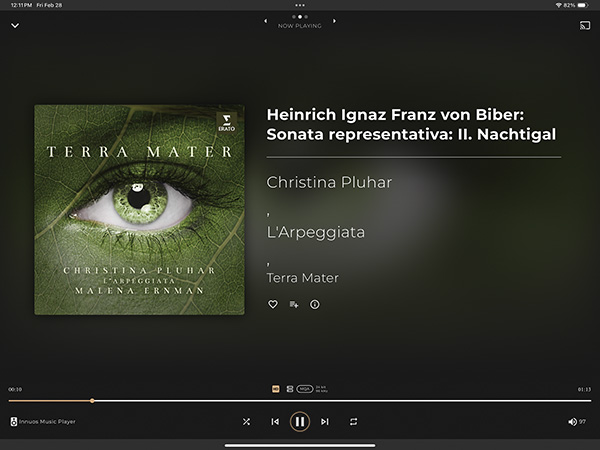
An aspect of Sense I especially enjoy is the Now Playing page. It's appropriately simple in its layout, and lovely. In lieu of a written description, I'll include an image. (
See image above.) This is what you see when you click on the album title at the bottom left in any Library view (Album, Artist, etc.). That's the track in bold, followed by a list of artists, then the name of the album, the cover art at left. Much information is conveyed via smaller text or by clicking on the "info" icon: source, format, bit depth, sample rate, whether you've selected it as a favorite. There's also a button to add the track to a playlist.
This is cool, if not unique: From this page, swipe right to view the past—your playback history. Swipe left to view the future, the playback Queue.
I had one rather serious disappointment with Sense, though it's in the process of being fixed: It is not yet optimized for classical music. Sense seems to have no awareness of the concept of multipart "Works." If music is sourced from a streaming service, you may see the Work first followed by the Movements—though it doesn't always display this way. If you add a work to the library yourself (from a ripped CD or even a paid download), you just see a series of tracks—no separation into Works. What's more, the name of the composer may not display unless it's stored in the track title or album title.
The upside of this relative paucity of metadata is that if you're doing the work yourself—entering your own metadata—there's less work to do, less data to enter. Anyway, it's only a matter of time until Innuos adds a classical-layout option.
Innuos Sense lacks fancy features like lyrics display, scrolling or otherwise—though it does a good job of displaying pdf booklets, showing them inside Sense instead of passing them off (as Roon does) to the device's default pdf viewer. Beyond that, Sense will display whatever information you've entered or that the streaming service provides, or whatever information was found when (and if) metadata was retrieved from a repository.
Innuos Sense works very well, but compared to the information-rich environment provided by, say, Roon or Apple Music, it can seem a bit austere.
Which is all fine when you consider that, as I wrote earlier, you use Roon instead of Sense, and experimentally at least, use Roon to manage the music and the part of Innuos Sense called the Innuos Music Player to play it.
 The Sense-ory experience
Some people still find it strange to attribute sonic character to a purely digital device; its only job, after all, is to send packets of bytes and bits over a wire. I'll admit—assert, actually—that I don't understand in any serious way how the purely digital stage can affect how music sounds, though the plausibility arguments are, well, plausible. For me it comes back to the notion of jitter—that in the real world, bits aren't bits but rather features of a waveform transmitted over a wire, with imperfections. True, outright reading errors are rare and usually corrected—but the leading edges of bits can be misidentified in the presence of noise and timing imperfection.
If you want to get an idea of what people working on these devices are thinking about what matters, give a careful read to the technical description of the Innuos ZENith Next-Gen, above.
Technical arguments over the plausibility of digital-only impact on the sound become moot once you hear it—and you
will hear it if the system you're listening on is sufficiently revealing.
What I describe below is easy to hear in any music, though I found most of it easiest in simpler music. This is an implicit comparison between the ZENith Next-Gen and the Roon Nucleus One, Roon's least-expensive server, although it might be easier to hear if a computer running Roon is the data source. In all listening tests, the Innuos streamer-server was running its native software.
As Sam Tellig's friend Lars (RIP) used to say, it's as though "a whale has lifted." No matter how awesome your system sounds—even if you're unaware of flaws—it can get better. You didn't know "the whale" was there until you heard it. It's hard to imagine the music being any crisper, any clearer—until you hear it crisper and clearer. Silences are more silent. Spaces between and among the aural images are blacker. Outlines are sharper. The music is resolved deeper into the soundstage. These are not big changes, but they are definite improvements, and they can be important.
I also had on hand the Innuos Statement, Innuos's two-box flagship player. I compared them. I bet no one will be surprised when I say the sound was very similar, but their virtues were slightly shifted. The Statement majors in liquidity and perhaps has a dash of extra soundstage depth. With the ZENith, I heard a bit more transient emphasis—a bit more leading edge to percussive notes.
Summing up
This review has been a bit different from most
Stereophile reviews, with relatively more emphasis on technical features and usability, less on sound. This is deliberate, since in my view, usability is a server's main function—and it's an area where proprietary software has struggled. There's more work to do, but progress has been made. The ZENith with Innuos Sense just works, it's a pleasure to use, and there's every expectation that it will only get better.
The thing about usability, though, is that it's more or less the same at vastly different prices. Innuos Sense will run on a ZENmini, which, equipped with 2TB of SSD storage, costs $2649. (A more direct comparison is the ZENith Mk.3, which with 2TB of storage costs $6699.) So why would you pay $20,700 for the ZENith Next-Gen equipped with 2TB of SSD storage and the PhoenixLite USB output module—which is to say, as the review sample was equipped?
There are several possible answers. The first is to note that the ZENith has more processing power than any of those other choices, so its performance should be snappier. Another answer is because it fits your budget and you want Innuos's best effort in a one-box streamer-server.
But the ZENith Next-Gen will give you better sound. The best answer—indeed, the only answer I endorse, for this or any other high-dollar item—is that you auditioned it and decided it was worth the asking price. Contact your dealer—there are more than 50 in the US—for an audition
Footnote 8: Based on my informal survey, the standard seems to be a woeful 128kbps. At that bitrate, sonic degradation is more or less obvious (depending on the music type), though even at that rate, music can still be enjoyable.