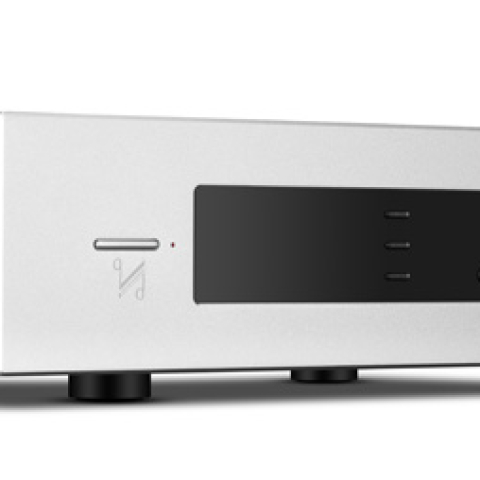

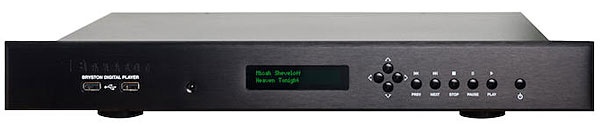
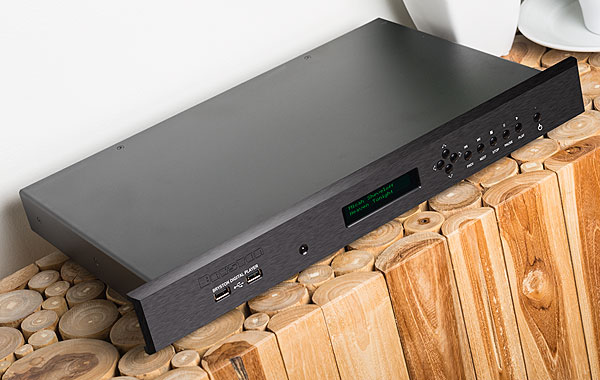
In February 2017, Bryston announced the latest upgrade of their Digital Player, introduced in 2011 as the BDP-1 ($2195), and upgraded in 2013 to the BDP-2, with a faster Atom N450 processor. The new BDP-3 Digital Player ($3495) comes equipped with an even faster Intel Quad-core processor; a Bryston-manufactured integrated audio device (IAD) in place of a third-party sound card; a custom Intel Celeron motherboard; a bigger power supply; and two additional USB ports, for a total of eight—three of which use the faster USB 3.0 protocol. Two USB 3.0 ports run on an entirely separate USB bus, making the BDP-3 compatible with the Streamlength protocols used by DACs from Ayre Acoustics and Berkeley Audio Design.
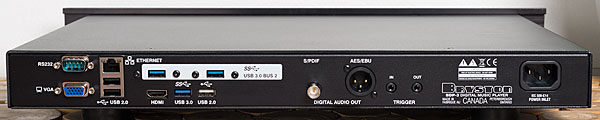 The BDP-3 can handle files of resolutions up to 32-bit/384kHz PCM and DSD128 (both via a USB-connected DAC), compared to the BDP-2's maximum of 24/192. The BDP-3 can also connect to more devices, including NAS drives, Internet radio, and lossless Tidal streaming (subscription required), and can be configured as a Roon Ready endpoint. The BDP-2's eSATA drive connector is gone, replaced by an HDMI port. In early June 2017, Bryston made it possible for BDP-2 owners increasingly frustrated by Bryston's rapid-fire upgrades of this model to have their units converted by Bryston to BDP-3 status for $1500. A brand-new BDP-3 costs $3495.
 But Bryston wasn't finished. In the second half of 2017, they announced for the BDP-3 a plug-in WiFi adapter, the Bryston WiFi Dongle Accessory Kit ($80). For BDP users such as I, running a long Ethernet cable through a wall from the BDP to a central home router was too difficult and/or too expensive. My main WiFi network router is nearest my Internet cable feed: in our garage, one floor and a few walls away from my listening room, on the second floor. Also announced were two options available to consumers ordering a new BDP-3: an internal WiFi option (approximately $200) and a 500GB internal drive (approximately $400, installed and set up).
I asked Bryston to send me a plug-in BDP WiFi adapter and to upgrade my BDP-2 to BDP-3 status. In response, I received a return authorization and a US mailing address in Vermont for returning BDP-2 to their US service facility. A month later, my former BDP-2 was sent back with a new rear panel, a new Intel Celeron motherboard, USB 3.0 ports, a new Quad core processor, and BDP firmware S2.32 (9/27/2017). Although the chassis still bore my BDP-2's original serial number, now followed by "-3," the data plate on the rear panel now identified it as a BDP-3. Two weeks later, the BDP WiFi adapter arrived, the same day that Bryston made available the BDP firmware required to support it: S2.36 (9/27/27).
But Bryston wasn't finished. In the second half of 2017, they announced for the BDP-3 a plug-in WiFi adapter, the Bryston WiFi Dongle Accessory Kit ($80). For BDP users such as I, running a long Ethernet cable through a wall from the BDP to a central home router was too difficult and/or too expensive. My main WiFi network router is nearest my Internet cable feed: in our garage, one floor and a few walls away from my listening room, on the second floor. Also announced were two options available to consumers ordering a new BDP-3: an internal WiFi option (approximately $200) and a 500GB internal drive (approximately $400, installed and set up).
I asked Bryston to send me a plug-in BDP WiFi adapter and to upgrade my BDP-2 to BDP-3 status. In response, I received a return authorization and a US mailing address in Vermont for returning BDP-2 to their US service facility. A month later, my former BDP-2 was sent back with a new rear panel, a new Intel Celeron motherboard, USB 3.0 ports, a new Quad core processor, and BDP firmware S2.32 (9/27/2017). Although the chassis still bore my BDP-2's original serial number, now followed by "-3," the data plate on the rear panel now identified it as a BDP-3. Two weeks later, the BDP WiFi adapter arrived, the same day that Bryston made available the BDP firmware required to support it: S2.36 (9/27/27).
 Set-Up
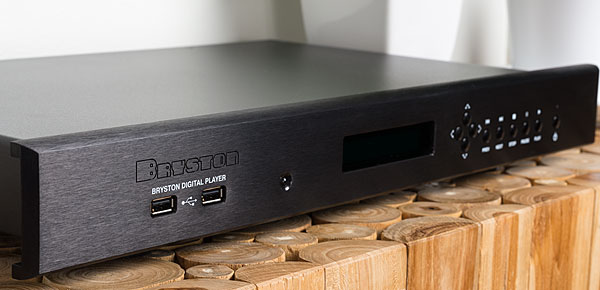
Setting up the BDP-3 involved connecting it to the Internet to download the S2.36 firmware, which required hauling the BDP-3 down to the garage and plugging it into our main router. I then returned the BDP-3 to my equipment rack on the second floor and plugged it into my in-room router. This allowed my Lenovo P50 laptop to wirelessly access the BDP-3's internal Web interface and media-player software. I inserted the WiFi adapter in a front-panel USB port and rebooted the Bryston. The adapter created its own wireless network, called Bryston Digital Player. Using my WiFi-connected laptop, I logged onto the BDP-3's internal webpage, which creates a dashboard-like user interface for altering the player's settings and controlling its media-player activities. (Previously, this internal webpage had been accessible to my laptop only if I plugged the BDP-3 into my home's main router.) The WiFi adapter plugged into one of the USB ports on the BDP-3's front panel made the dashboard accessible on my laptop when it was connected to the same WiFi network as the BDP-3.) I found a list of WiFi networks, and chose "ATT6VX23da"—my internet-connected house network—and entered its password. This connected the BDP-3 to my home WiFi network wirelessly, no Ethernet cable needed!
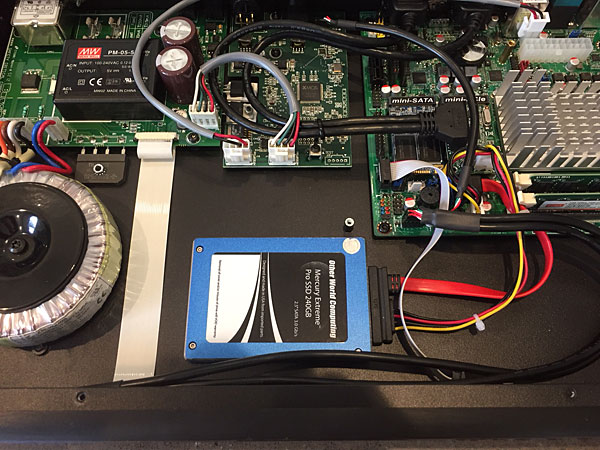 I encountered two minor glitches along the way, but e-mails from Bryston technical support quickly resolved them. A wiring-harness connector for the two USB ports on the front panel had been plugged in upside down at the factory (I sent Bryston a photo showing this). This inverted the voltage in the ports, resulting in fatal damage to any thumb drive inserted therein (footnote 1). Following Bryston's instructions, I unplugged, inverted, and replugged the connector. First problem solved—and opening the Bryston to fix it allowed me to see the high-quality replacement parts, including a bigger power-supply transformer, the new motherboard, and the new processor with its massive heatsink.
The other glitch: Installing the WiFi adapter requires a step missing from the setup instructions: The BDP-3 must be returned to its factory default settings before installation of the adapter can be completed, otherwise its internal dashboard network-connection options can't find it. I sent Bryston another e-mail. Their reply included the missing step. Second problem solved.
Bryston assures me that both the wiring-harness problem and the omission of the "Reset to Defaults" step will be addressed before any more BDP-2s are upgraded to BDP-3s, and/or before any more WiFi adapters are sent to customers.
Bryston's latest media-player software displays much more album-cover art and information about artists, is much more responsive, and hasn't once frozen up since I turned it on. However, the BDP-3 takes as long to boot up or shut down as did the BDP-2: 45 seconds to boot up (50 seconds if I load all the USB ports with hard drives, internal SSD, USB thumb drives, and the WiFi adapter), 30 seconds to shut down.
I encountered two minor glitches along the way, but e-mails from Bryston technical support quickly resolved them. A wiring-harness connector for the two USB ports on the front panel had been plugged in upside down at the factory (I sent Bryston a photo showing this). This inverted the voltage in the ports, resulting in fatal damage to any thumb drive inserted therein (footnote 1). Following Bryston's instructions, I unplugged, inverted, and replugged the connector. First problem solved—and opening the Bryston to fix it allowed me to see the high-quality replacement parts, including a bigger power-supply transformer, the new motherboard, and the new processor with its massive heatsink.
The other glitch: Installing the WiFi adapter requires a step missing from the setup instructions: The BDP-3 must be returned to its factory default settings before installation of the adapter can be completed, otherwise its internal dashboard network-connection options can't find it. I sent Bryston another e-mail. Their reply included the missing step. Second problem solved.
Bryston assures me that both the wiring-harness problem and the omission of the "Reset to Defaults" step will be addressed before any more BDP-2s are upgraded to BDP-3s, and/or before any more WiFi adapters are sent to customers.
Bryston's latest media-player software displays much more album-cover art and information about artists, is much more responsive, and hasn't once frozen up since I turned it on. However, the BDP-3 takes as long to boot up or shut down as did the BDP-2: 45 seconds to boot up (50 seconds if I load all the USB ports with hard drives, internal SSD, USB thumb drives, and the WiFi adapter), 30 seconds to shut down.
 Sound Quality
The BDP-3's sound quality was slightly but definitely better than the BDP-2's. Bass extension was improved for pipe-organ pedal notes, which not only pressurized the room but now seemed to reach below the floor. The timbres of woodwinds were richer and more complex, particularly at the beginning of Eiji Oue and the Minnesota Orchestra's recording of Stravinsky's The Rite of Spring (CD, Reference RR-70CD), followed by well-defined, frenzied timpani impacts, and bass-drum strokes that were sudden, concussive, and thunderous. I found the sound more involving, and it enticed me to listen longer to each selection. Choral recordings were particularly clear, open, and more detailed than I remembered from the BDP-2. The performance of Eric Whitacre's Lux Arumque from While You Are Alive, by the men's choir Cantus (CD, Cantus CTS-1208)—a recording engineered by our own John Atkinson—sounded more impressively spacious and atmospheric than I'd ever heard it. I could hear deeper into the soundstage as well as "The 'beating' within the harmonies," as the late Wes Phillips noted in his review of the Ayre KR-X line preamplifier in November 2008.
Conclusions
The advantages of upgrading a BDP-2 to a BDP-3 with firmware S2.36 include overall increased revelations of recorded detail, extended bass response, enhanced network flexibility, the versatility of the BDP-3's new high-speed USB 3.0 ports, a new HDMI port, access to a wider range of DACs, and the ability to play PCM files of higher sampling rates. The improved processor and motherboard should make playback of DSD256 files possible through future firmware updates. However, Bryston hasn't yet decided whether or not to include MQA capability in their digital gear, which may make some think twice about upgrading to a BDP-3. But don't wait to buy the BDP WiFi adapter. And those ordering a brand-new BDP-3 should be sure to include the optional internal 500GB SSD and WiFi circuitry. If you want to own the latest and greatest, doing the math shows that having Bryston transform your BDP-2 into a BDP-3 makes financial sense. Audiogon Bluebook lists the BDP-2's private sale price as $1645. If you sell your BDP-2 at that price and buy a new BDP-3, you'll still have to come up with $1850—which is $350 more than the $1500 upgrade.
Footnote 1: A slow learner, I tried five thumb drives before I realized that each one was instantly destroyed as soon as I inserted it. All of the files on those drives were from CDs I still have, but re-ripping them to new drives is still on my to-do list.
The BDP-3 can handle files of resolutions up to 32-bit/384kHz PCM and DSD128 (both via a USB-connected DAC), compared to the BDP-2's maximum of 24/192. The BDP-3 can also connect to more devices, including NAS drives, Internet radio, and lossless Tidal streaming (subscription required), and can be configured as a Roon Ready endpoint. The BDP-2's eSATA drive connector is gone, replaced by an HDMI port. In early June 2017, Bryston made it possible for BDP-2 owners increasingly frustrated by Bryston's rapid-fire upgrades of this model to have their units converted by Bryston to BDP-3 status for $1500. A brand-new BDP-3 costs $3495.
But Bryston wasn't finished. In the second half of 2017, they announced for the BDP-3 a plug-in WiFi adapter, the Bryston WiFi Dongle Accessory Kit ($80). For BDP users such as I, running a long Ethernet cable through a wall from the BDP to a central home router was too difficult and/or too expensive. My main WiFi network router is nearest my Internet cable feed: in our garage, one floor and a few walls away from my listening room, on the second floor. Also announced were two options available to consumers ordering a new BDP-3: an internal WiFi option (approximately $200) and a 500GB internal drive (approximately $400, installed and set up).
Set-UpSetting up the BDP-3 involved connecting it to the Internet to download the S2.36 firmware, which required hauling the BDP-3 down to the garage and plugging it into our main router. I then returned the BDP-3 to my equipment rack on the second floor and plugged it into my in-room router. This allowed my Lenovo P50 laptop to wirelessly access the BDP-3's internal Web interface and media-player software. I inserted the WiFi adapter in a front-panel USB port and rebooted the Bryston. The adapter created its own wireless network, called Bryston Digital Player. Using my WiFi-connected laptop, I logged onto the BDP-3's internal webpage, which creates a dashboard-like user interface for altering the player's settings and controlling its media-player activities. (Previously, this internal webpage had been accessible to my laptop only if I plugged the BDP-3 into my home's main router.) The WiFi adapter plugged into one of the USB ports on the BDP-3's front panel made the dashboard accessible on my laptop when it was connected to the same WiFi network as the BDP-3.) I found a list of WiFi networks, and chose "ATT6VX23da"—my internet-connected house network—and entered its password. This connected the BDP-3 to my home WiFi network wirelessly, no Ethernet cable needed!
I encountered two minor glitches along the way, but e-mails from Bryston technical support quickly resolved them. A wiring-harness connector for the two USB ports on the front panel had been plugged in upside down at the factory (I sent Bryston a photo showing this). This inverted the voltage in the ports, resulting in fatal damage to any thumb drive inserted therein (footnote 1). Following Bryston's instructions, I unplugged, inverted, and replugged the connector. First problem solved—and opening the Bryston to fix it allowed me to see the high-quality replacement parts, including a bigger power-supply transformer, the new motherboard, and the new processor with its massive heatsink.
The other glitch: Installing the WiFi adapter requires a step missing from the setup instructions: The BDP-3 must be returned to its factory default settings before installation of the adapter can be completed, otherwise its internal dashboard network-connection options can't find it. I sent Bryston another e-mail. Their reply included the missing step. Second problem solved.
Bryston assures me that both the wiring-harness problem and the omission of the "Reset to Defaults" step will be addressed before any more BDP-2s are upgraded to BDP-3s, and/or before any more WiFi adapters are sent to customers.
Sound QualityThe BDP-3's sound quality was slightly but definitely better than the BDP-2's. Bass extension was improved for pipe-organ pedal notes, which not only pressurized the room but now seemed to reach below the floor. The timbres of woodwinds were richer and more complex, particularly at the beginning of Eiji Oue and the Minnesota Orchestra's recording of Stravinsky's The Rite of Spring (CD, Reference RR-70CD), followed by well-defined, frenzied timpani impacts, and bass-drum strokes that were sudden, concussive, and thunderous. I found the sound more involving, and it enticed me to listen longer to each selection. Choral recordings were particularly clear, open, and more detailed than I remembered from the BDP-2. The performance of Eric Whitacre's Lux Arumque from While You Are Alive, by the men's choir Cantus (CD, Cantus CTS-1208)—a recording engineered by our own John Atkinson—sounded more impressively spacious and atmospheric than I'd ever heard it. I could hear deeper into the soundstage as well as "The 'beating' within the harmonies," as the late Wes Phillips noted in his review of the Ayre KR-X line preamplifier in November 2008.
The advantages of upgrading a BDP-2 to a BDP-3 with firmware S2.36 include overall increased revelations of recorded detail, extended bass response, enhanced network flexibility, the versatility of the BDP-3's new high-speed USB 3.0 ports, a new HDMI port, access to a wider range of DACs, and the ability to play PCM files of higher sampling rates. The improved processor and motherboard should make playback of DSD256 files possible through future firmware updates. However, Bryston hasn't yet decided whether or not to include MQA capability in their digital gear, which may make some think twice about upgrading to a BDP-3. But don't wait to buy the BDP WiFi adapter. And those ordering a brand-new BDP-3 should be sure to include the optional internal 500GB SSD and WiFi circuitry. If you want to own the latest and greatest, doing the math shows that having Bryston transform your BDP-2 into a BDP-3 makes financial sense. Audiogon Bluebook lists the BDP-2's private sale price as $1645. If you sell your BDP-2 at that price and buy a new BDP-3, you'll still have to come up with $1850—which is $350 more than the $1500 upgrade.
Footnote 1: A slow learner, I tried five thumb drives before I realized that each one was instantly destroyed as soon as I inserted it. All of the files on those drives were from CDs I still have, but re-ripping them to new drives is still on my to-do list.