
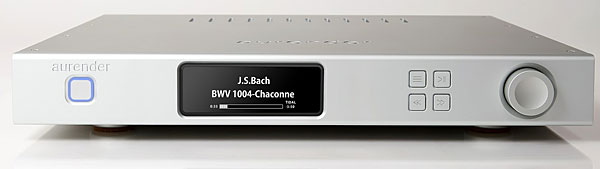
A huge fuss was made over Aurender's first music server, the S10, when it premiered in 2011 at the California Audio Show. While I didn't feel that the room acoustics and setup were good enough at CAS to permit an honest appraisal, the looks and features of the S10 (now discontinued) thrust Aurender into the spotlight. So when John Atkinson, who had very favorably reviewed Aurender's N10 server in April 2016, asked if I would evaluate Aurender's new A10, the opportunity to serve so many audiophiles with a single review elicited from me an unequivocal "Yes!"
What have we here?
As part of a product line that includes multiple streamer/servers and a "lifestyle" DAC-integrated amp, the A10 is Aurender's first all-in-one model. Its single full-size case contains a network music player-server similar to the company's entry-level N100H caching music server, with the addition of what Aurender calls a "high-performance," MQA-certified DAC. The A10's all-in-one design and $5500 price should make it especially appealing to budget-conscious audiophiles. Those able to pay more will appreciate the superior power supplies, clocking systems, and noise isolation of Aurender's higher-end models, as well as their greater storage capacity, higher numbers of inputs, and other features. Aurender is a South Korean company. John-Paul Lizars, the California-based industry veteran who heads the sales and marketing division of Aurender America, calls the A10 "the CD player of the 21st century . . . that distills a complex process to the essence of simplicity." That's a claim worth examining.
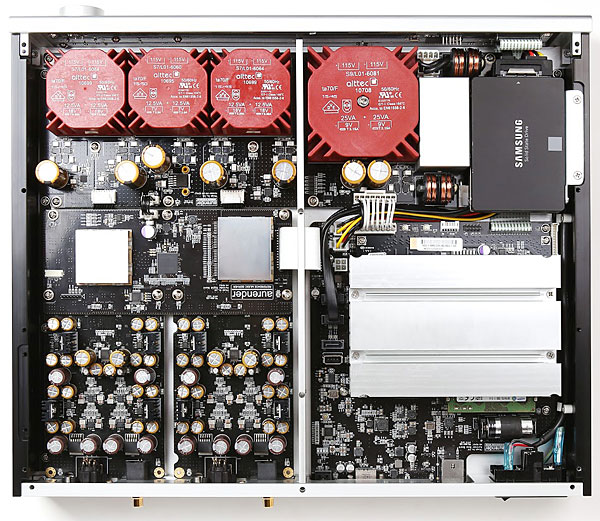
 The A10's DAC, designed by John Kim and Justin Jang, uses the Asahi Kasei Microdevices Corporation's AKM 4490 32-bit, 2-channel chip, employed in a fully discrete and balanced dual-mono configuration. (The DAC's linear power supplies are also configured as dual-mono.) The chip has five 32-bit digital filters, and accepts data up to 768kHz PCM and 11.2MHz DSD. Due to the A10's implementation of the DoP protocol, however, at present it can process only DSD64 and DSD128 (5.6448MHz). It also decodes MQA files.
Storage is limited to a 4TB hard disk drive (a 5TB Seagate drive option is in the testing phase), while cached playback is via a 120GB solid-state drive. This two-drive system—in which music stored on the HDD is cached for playback on the SSD—is claimed to completely eliminate electrical and acoustic noise produced by spinning disks, moving heads, and motors.
An HDD icon appears on the Aurender's large, adjustable display as a new track is being cached to SSD. During this period, which doesn't last very long, ultimate sound quality is sacrificed. When the track has been transferred, the HD then goes to sleep to minimize wear, and the sound level returns to optimal.
One of the A10's many features is its ability to use its S/PDIF (TosLink) input to interface with a CD or DVD player, as well as a TV or multi-zone system such as Sonos. In such situations, the A10's variable output enables it to function as a preamplifier in an all-digital system. In addition, the A10's USB 2.0 output lets you send signals to an outboard DAC. The A10 can also play music stored on NAS drives via its Aurender Media Manager (AMM) software and the all-important Aurender Conductor app.
The A10's DAC, designed by John Kim and Justin Jang, uses the Asahi Kasei Microdevices Corporation's AKM 4490 32-bit, 2-channel chip, employed in a fully discrete and balanced dual-mono configuration. (The DAC's linear power supplies are also configured as dual-mono.) The chip has five 32-bit digital filters, and accepts data up to 768kHz PCM and 11.2MHz DSD. Due to the A10's implementation of the DoP protocol, however, at present it can process only DSD64 and DSD128 (5.6448MHz). It also decodes MQA files.
Storage is limited to a 4TB hard disk drive (a 5TB Seagate drive option is in the testing phase), while cached playback is via a 120GB solid-state drive. This two-drive system—in which music stored on the HDD is cached for playback on the SSD—is claimed to completely eliminate electrical and acoustic noise produced by spinning disks, moving heads, and motors.
An HDD icon appears on the Aurender's large, adjustable display as a new track is being cached to SSD. During this period, which doesn't last very long, ultimate sound quality is sacrificed. When the track has been transferred, the HD then goes to sleep to minimize wear, and the sound level returns to optimal.
One of the A10's many features is its ability to use its S/PDIF (TosLink) input to interface with a CD or DVD player, as well as a TV or multi-zone system such as Sonos. In such situations, the A10's variable output enables it to function as a preamplifier in an all-digital system. In addition, the A10's USB 2.0 output lets you send signals to an outboard DAC. The A10 can also play music stored on NAS drives via its Aurender Media Manager (AMM) software and the all-important Aurender Conductor app.
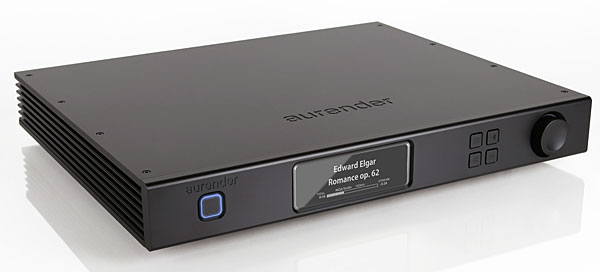 Both an iPad and wireless router are essential to operate the A10. Even before the Aurender is plugged in, users are instructed to download Conductor from Apple's App Store. (The Aurender App for Android is based on the iPad app but apparently has limited functionality.) After the A10 is connected to the Internet via Ethernet and the correct information is entered in the settings, the app should communicate seamlessly with the A10.
While some of the A10's basic functions can be controlled via buttons on its front panel or with its supplied remote control, all settings, playback, and storage functions are managed using Conductor, including music from Tidal and Internet radio.
If memory serves me, the handsome brown-and-yellow color scheme of the Conductor app has remained consistent since the days of the S10. When selections are played, album-cover art, the bit depth and sampling rate, and the file format (eg, FLAC or WAV) are displayed. In addition to Play, Pause, and Stop, you can Repeat a single track or an entire playlist. You can also play single tracks without automatically playing the tracks that follow. However, once you cue up a playlist, convincing the A10 to wait for your command to play music is a tricky business. Every time I chose my playlist or list of cached tracks, the first of those tracks, Yello's "Electrified II," would start booming away without my consent. Gah! This was not the shock my nervous system needed when I was all geared up psychically for hearing something very different.
Rather than tediously list everything the A10 and Conductor can do, I refer you to the A10's far too slim online manual and New Features in Conductor App webpage. While a huge amount of essential support information is available online, that section of Aurender's website was "under construction" during the review period, and what was available was outdated. Navigation was difficult, nomenclature inconsistent, and the product line included discontinued models.
Both an iPad and wireless router are essential to operate the A10. Even before the Aurender is plugged in, users are instructed to download Conductor from Apple's App Store. (The Aurender App for Android is based on the iPad app but apparently has limited functionality.) After the A10 is connected to the Internet via Ethernet and the correct information is entered in the settings, the app should communicate seamlessly with the A10.
While some of the A10's basic functions can be controlled via buttons on its front panel or with its supplied remote control, all settings, playback, and storage functions are managed using Conductor, including music from Tidal and Internet radio.
If memory serves me, the handsome brown-and-yellow color scheme of the Conductor app has remained consistent since the days of the S10. When selections are played, album-cover art, the bit depth and sampling rate, and the file format (eg, FLAC or WAV) are displayed. In addition to Play, Pause, and Stop, you can Repeat a single track or an entire playlist. You can also play single tracks without automatically playing the tracks that follow. However, once you cue up a playlist, convincing the A10 to wait for your command to play music is a tricky business. Every time I chose my playlist or list of cached tracks, the first of those tracks, Yello's "Electrified II," would start booming away without my consent. Gah! This was not the shock my nervous system needed when I was all geared up psychically for hearing something very different.
Rather than tediously list everything the A10 and Conductor can do, I refer you to the A10's far too slim online manual and New Features in Conductor App webpage. While a huge amount of essential support information is available online, that section of Aurender's website was "under construction" during the review period, and what was available was outdated. Navigation was difficult, nomenclature inconsistent, and the product line included discontinued models.
 So when problems or questions arise, Aurender's remarkably responsive US technical-support person, the Seattle-based Jesse Locken, encourages users to contact him and Aurender's staff in Korea via the app's Help feature. Locken usually replied quickly with a link to the appropriate support pages, which otherwise are difficult to find. If something needs fixing, owners are asked to leave their units on so that someone in Korea can check them out remotely, via the Internet, and fix the problem.
The last page of Aurender's 15-page Quick Start Guide warns users to follow a two-step turn-off procedure before they disconnect from AC power, lest they unmount or corrupt the internal SSD drive, thus "crippling or rendering the unit inoperative." Try telling that to the reviewer who inadvertently pulled out the A10's power cord while performing multiple listening tests and cable swaps.
When I did that, my heart skipped more than one beat as the disconnected A10 powered down, went very, very quiet, and finally, after what seemed an eternity, announced that it was rebuilding its HDD. But it had completed only a small percentage of that rebuild when it seemed to freeze up again.
Oh, no, thought I. Please may I not become the reviewer who broke the A10's back. Thank goodness, after another be-still-my-beating-heart wait, the A10's display proclaimed that all was okay. HDD rebuilt. Eternal damnation averted.
Setup and Listening, Round One
So when problems or questions arise, Aurender's remarkably responsive US technical-support person, the Seattle-based Jesse Locken, encourages users to contact him and Aurender's staff in Korea via the app's Help feature. Locken usually replied quickly with a link to the appropriate support pages, which otherwise are difficult to find. If something needs fixing, owners are asked to leave their units on so that someone in Korea can check them out remotely, via the Internet, and fix the problem.
The last page of Aurender's 15-page Quick Start Guide warns users to follow a two-step turn-off procedure before they disconnect from AC power, lest they unmount or corrupt the internal SSD drive, thus "crippling or rendering the unit inoperative." Try telling that to the reviewer who inadvertently pulled out the A10's power cord while performing multiple listening tests and cable swaps.
When I did that, my heart skipped more than one beat as the disconnected A10 powered down, went very, very quiet, and finally, after what seemed an eternity, announced that it was rebuilding its HDD. But it had completed only a small percentage of that rebuild when it seemed to freeze up again.
Oh, no, thought I. Please may I not become the reviewer who broke the A10's back. Thank goodness, after another be-still-my-beating-heart wait, the A10's display proclaimed that all was okay. HDD rebuilt. Eternal damnation averted.
Setup and Listening, Round One
Aurender's Jesse Locken doesn't live far away, and he dropped by to help me set up the A10. My four-shelf rack was already filled with multiple dCS components and power products—the only space for the A10 was atop the dCS Scarlatti clock. After connecting the router and Pass monoblocks to the A10, we powered up the latter and inserted, one by one, three USB 3.0 sticks filled with high-resolution tracks into the A10's USB port, and used the Conductor app to transfer their contents to the A10's HDD. Tracks whose sound I knew well we arranged in a playlist I named "JVS Test." After letting the A10 warm up a bit—it was already broken in—Locken checked that everything was functioning as it should, and quickly noticed that the A10's HDD icon was not turning on during file transfer from HDD to SSD. Without it, we couldn't tell when the unit was delivering optimal sound. Before leaving, he promised to check with Aurender HQ in Korea and get back to me. When I gave the A10 my first solo listen days later, after the cables had settled in, the A10 didn't sound very good. Speculating that its performance was compromised because I'd placed it atop the dCS Scarlatti, I turned the Scarlatti off.That made a major difference.
As part of a product line that includes multiple streamer/servers and a "lifestyle" DAC-integrated amp, the A10 is Aurender's first all-in-one model. Its single full-size case contains a network music player-server similar to the company's entry-level N100H caching music server, with the addition of what Aurender calls a "high-performance," MQA-certified DAC. The A10's all-in-one design and $5500 price should make it especially appealing to budget-conscious audiophiles. Those able to pay more will appreciate the superior power supplies, clocking systems, and noise isolation of Aurender's higher-end models, as well as their greater storage capacity, higher numbers of inputs, and other features. Aurender is a South Korean company. John-Paul Lizars, the California-based industry veteran who heads the sales and marketing division of Aurender America, calls the A10 "the CD player of the 21st century . . . that distills a complex process to the essence of simplicity." That's a claim worth examining.
The A10's DAC, designed by John Kim and Justin Jang, uses the Asahi Kasei Microdevices Corporation's AKM 4490 32-bit, 2-channel chip, employed in a fully discrete and balanced dual-mono configuration. (The DAC's linear power supplies are also configured as dual-mono.) The chip has five 32-bit digital filters, and accepts data up to 768kHz PCM and 11.2MHz DSD. Due to the A10's implementation of the DoP protocol, however, at present it can process only DSD64 and DSD128 (5.6448MHz). It also decodes MQA files.
Storage is limited to a 4TB hard disk drive (a 5TB Seagate drive option is in the testing phase), while cached playback is via a 120GB solid-state drive. This two-drive system—in which music stored on the HDD is cached for playback on the SSD—is claimed to completely eliminate electrical and acoustic noise produced by spinning disks, moving heads, and motors.
An HDD icon appears on the Aurender's large, adjustable display as a new track is being cached to SSD. During this period, which doesn't last very long, ultimate sound quality is sacrificed. When the track has been transferred, the HD then goes to sleep to minimize wear, and the sound level returns to optimal.
Both an iPad and wireless router are essential to operate the A10. Even before the Aurender is plugged in, users are instructed to download Conductor from Apple's App Store. (The Aurender App for Android is based on the iPad app but apparently has limited functionality.) After the A10 is connected to the Internet via Ethernet and the correct information is entered in the settings, the app should communicate seamlessly with the A10.
While some of the A10's basic functions can be controlled via buttons on its front panel or with its supplied remote control, all settings, playback, and storage functions are managed using Conductor, including music from Tidal and Internet radio.
So when problems or questions arise, Aurender's remarkably responsive US technical-support person, the Seattle-based Jesse Locken, encourages users to contact him and Aurender's staff in Korea via the app's Help feature. Locken usually replied quickly with a link to the appropriate support pages, which otherwise are difficult to find. If something needs fixing, owners are asked to leave their units on so that someone in Korea can check them out remotely, via the Internet, and fix the problem.
Aurender's Jesse Locken doesn't live far away, and he dropped by to help me set up the A10. My four-shelf rack was already filled with multiple dCS components and power products—the only space for the A10 was atop the dCS Scarlatti clock. After connecting the router and Pass monoblocks to the A10, we powered up the latter and inserted, one by one, three USB 3.0 sticks filled with high-resolution tracks into the A10's USB port, and used the Conductor app to transfer their contents to the A10's HDD. Tracks whose sound I knew well we arranged in a playlist I named "JVS Test." After letting the A10 warm up a bit—it was already broken in—Locken checked that everything was functioning as it should, and quickly noticed that the A10's HDD icon was not turning on during file transfer from HDD to SSD. Without it, we couldn't tell when the unit was delivering optimal sound. Before leaving, he promised to check with Aurender HQ in Korea and get back to me. When I gave the A10 my first solo listen days later, after the cables had settled in, the A10 didn't sound very good. Speculating that its performance was compromised because I'd placed it atop the dCS Scarlatti, I turned the Scarlatti off.That made a major difference.