
For a growing number of people, music is free, or virtually so. If you don't want to deal with ads, $9.99 a month buys you unlimited, ad-free access to millions of tracks. At least at present, streaming from services like Spotify, YouTube, and Pandora is where music consumption is headed—and it's really all that most people want.
You and I are different. We collect music, and care about the quality of our listening experience. We care because listening to music is something we do while not doing anything else. This makes us: a) an increasingly rare species, b) not content with lossy streaming, c) on the road to complexity, and d) simultaneously richer and poorer.
For collectors, digital music means discs or files. Removing the spinning disc from digital playback opens us up to an endless stream of music—a dream come true. While the fulfillment of this dream entails a certain amount of added complexity compared to popping a CD into a player, a music server can offer a nice, relatively simple, one-stop shop.
Of course, any computer can function as a music server, even if computers weren't designed for that purpose. The reason to consider a purpose-built device should be obvious—it's designed to do one thing really well: serve your music.
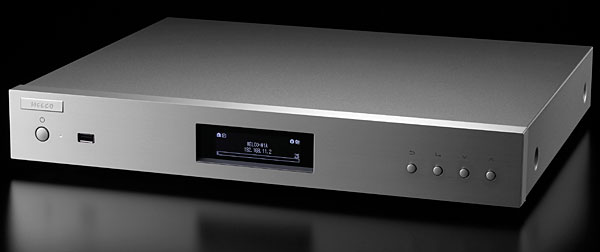
Melco N1A High Resolution Digital Music Library ($1999)
In 1975, in Japan, Makoto Maki founded the Maki Engineering Laboratory Company (Melco), "to design and manufacture the finest audio components of the time." Melco's flagship product back in the day was their 3560 Turntable System, which was similar in approach to another 1970s 'table, the original Platine Verdier. Then, at the beginning of the 1980s, Maki put his audio company on hold in order to build Buffalo Inc., which has since become Japan's largest manufacturer of computer peripherals. Now Melco has been resurrected as a maker of networked audio components, combining Maki's audiophile roots with the high-tech manufacturing chops of Melco Holdings (footnote 1). I love stories of resurrection inspired by passion.
Melco currently offers two products: the N1A and the N1Z, each of which is called a High Resolution Digital Music Library. These servers were designed for music collectors—they won't play from Internet streaming services. One difference between the two models is that the N1A uses hard-disk drives, while the N1Z uses solid-state drives. The subject of this column is the N1A; owing to what Melco describes as licensing issues, the N1Z is not yet available in the US.
Simple Version (Sorta)
The Melco N1A has 4TB of internal storage. If you currently store your music on a USB drive, all you need do is plug it into the N1A, then answer "OK" when it asks if you want to copy the drive's contents to the Melco. You can also drag and drop music into the N1A using a computer: When the N1A is connected to your network (router, switch, or hub) with an Ethernet cable, it'll show up on your network as a shared storage device. If you want to use a USB DAC to convert the Melco's digital output to analog, just use a USB link to connect your DAC to any of the three USB ports on the N1A's rear panel. If you want to use a network player instead, and have already connected your N1A and player to your network, you're good to go. Melco recommends using the PlugPlayer remote app for iOS and Android devices to operate the N1A, so you'll also want to have an iOS or Android device to use as a remote.
Once you've connected everything, loaded PlugPlayer, moved your music into the N1A, and used the front-panel controls to tell the N1A where to send your music, you're ready to play. See? Simple.
Sorta.
Less Simple Version
Inside the Melco N1A are two 2TB, low-noise hard-disk drives made by Seagate, configured and delivered as a single drive, which is how I like it. You can also opt to configure these drives as a RAID 0 or RAID 1 array (RAID=redundant array of independent disks), but because a RAID array provides fault tolerance only in the event of disk failure, I recommend sticking with the entire 4TB for your music, and getting an external USB drive for true backup. The N1A's outputs all reside around back and include three ways for its internal music library to be output in digital form: by connecting one of the rear-mounted USB ports to a USB DAC, by connecting the Ethernet port marked LAN to your network (router, switch, or hub), or by connecting the Ethernet port marked Player directly to your network player. The preferred method obviously depends on whether or not you want to use a USB DAC or a network player. If you opt for the latter, you then need to decide if you want your network player to reside on your network, allowing you to use your favorite Universal Plug and Play (UPnP) remote app to control playback. (Think of UPnP as the language these devices use to talk to one another.) If you choose to connect the N1A directly to your network player, that player must offer a hardware-based means of controlling playback since, it's not accessible from a remote app.
Footnote 1: Melco Holdings, Inc., Nagoya, Aichi, Japan. Web: www.melco-audio.com. US distributor: The Sound Organisation: 159 Leslie Street, Dallas, TX 75207. Tel: (972) 234-0182. Web: www.soundorg.com.
In 1975, in Japan, Makoto Maki founded the Maki Engineering Laboratory Company (Melco), "to design and manufacture the finest audio components of the time." Melco's flagship product back in the day was their 3560 Turntable System, which was similar in approach to another 1970s 'table, the original Platine Verdier. Then, at the beginning of the 1980s, Maki put his audio company on hold in order to build Buffalo Inc., which has since become Japan's largest manufacturer of computer peripherals. Now Melco has been resurrected as a maker of networked audio components, combining Maki's audiophile roots with the high-tech manufacturing chops of Melco Holdings (footnote 1). I love stories of resurrection inspired by passion.
The Melco N1A has 4TB of internal storage. If you currently store your music on a USB drive, all you need do is plug it into the N1A, then answer "OK" when it asks if you want to copy the drive's contents to the Melco. You can also drag and drop music into the N1A using a computer: When the N1A is connected to your network (router, switch, or hub) with an Ethernet cable, it'll show up on your network as a shared storage device. If you want to use a USB DAC to convert the Melco's digital output to analog, just use a USB link to connect your DAC to any of the three USB ports on the N1A's rear panel. If you want to use a network player instead, and have already connected your N1A and player to your network, you're good to go. Melco recommends using the PlugPlayer remote app for iOS and Android devices to operate the N1A, so you'll also want to have an iOS or Android device to use as a remote.
Inside the Melco N1A are two 2TB, low-noise hard-disk drives made by Seagate, configured and delivered as a single drive, which is how I like it. You can also opt to configure these drives as a RAID 0 or RAID 1 array (RAID=redundant array of independent disks), but because a RAID array provides fault tolerance only in the event of disk failure, I recommend sticking with the entire 4TB for your music, and getting an external USB drive for true backup. The N1A's outputs all reside around back and include three ways for its internal music library to be output in digital form: by connecting one of the rear-mounted USB ports to a USB DAC, by connecting the Ethernet port marked LAN to your network (router, switch, or hub), or by connecting the Ethernet port marked Player directly to your network player. The preferred method obviously depends on whether or not you want to use a USB DAC or a network player. If you opt for the latter, you then need to decide if you want your network player to reside on your network, allowing you to use your favorite Universal Plug and Play (UPnP) remote app to control playback. (Think of UPnP as the language these devices use to talk to one another.) If you choose to connect the N1A directly to your network player, that player must offer a hardware-based means of controlling playback since, it's not accessible from a remote app.
Footnote 1: Melco Holdings, Inc., Nagoya, Aichi, Japan. Web: www.melco-audio.com. US distributor: The Sound Organisation: 159 Leslie Street, Dallas, TX 75207. Tel: (972) 234-0182. Web: www.soundorg.com.