
ConversDigital utilizes a set of networking protocols called UPnP, or Universal Plug and Play, and publishes a family of UPnP apps for iPhone and Android—the mConnect apps mentioned above. The apps interact with the hardware to let you stream Tidal, Qobuz, and other services direct from the Internet.
I pulled out my iPad, opened the App Store, searched on mConnect, and got several relevant results. I downloaded a free app, mConnect Control. There are also several versions of mConnect Player: a free, "Lite" version; a portrait-format version intended for iPhones; and a landscape-format "HD" version intended for use on iPads. These last two cost $5.99 each.
I downloaded mConnect Control, opened the app, and clicked on a button called Play to. The Brooklyn Bridge appeared as one of two choices; the other was the iPad itself. I selected the Mytek as the playback device.
I noticed another button in the app, labeled Browser. I clicked on it and discovered three categories: "Internet Music," "Cloud", and "Local Server." The "Internet Music" category listed Tidal, Qobuz, Spotify, Deezer, vTuner—the motherlode. I clicked on Tidal, entered my username and password, and a minute later was listening to the new Bruce Springsteen album, Western Stars, through the Mytek Brooklyn Bridge. I repeated this with Qobuz, which worked just as well.
 To make a system like this work well, you need search capability. I had to look for a while to find Search within mConnect. It's there, but in a different place for each music-streaming app.
Think of mConnect Control, then—and the mConnect Player apps—as a wrapper: The streaming apps run inside mConnect Control. Inside the app, Tidal and Qobuz have pretty much the same features as when they run independently. The interface isn't elegant—there are, for example, two sets of favorites: your mConnect favorites and your Tidal or Qobuz favorites—but it works. If you want to get your Qobuz or Tidal out of your portable device and into a DAC without dedicating a computer to the task, this is how you do it.
One more bridge to cross
To make a system like this work well, you need search capability. I had to look for a while to find Search within mConnect. It's there, but in a different place for each music-streaming app.
Think of mConnect Control, then—and the mConnect Player apps—as a wrapper: The streaming apps run inside mConnect Control. Inside the app, Tidal and Qobuz have pretty much the same features as when they run independently. The interface isn't elegant—there are, for example, two sets of favorites: your mConnect favorites and your Tidal or Qobuz favorites—but it works. If you want to get your Qobuz or Tidal out of your portable device and into a DAC without dedicating a computer to the task, this is how you do it.
One more bridge to cross
I wanted to see how different the experience was with one of the paid mConnect Player apps, so I dropped $5.99 and downloaded the HD version, the one intended for iPads. Except for the horizontal orientation, I found the experience much the same as with the free Control. When you click on the Browser button inside mConnect Player—it works the same way in mConnect Control—you see other things besides streaming apps. You also see cloud services: Dropbox, OneDrive, iCloud Drive. You can, if you wish, stream your own music hosted in the cloud. Nifty. You also see any local media on which music can be stored. I saw my iPad, a Western Digital My Cloud server I use to back up photographs, and something called Mytek Brooklyn Bridge HEM003650 Server. What's that, then?
As previously mentioned, there's a USB Type-A connector on the back of the Brooklyn Bridge. Connect a drive of some sort—an external SSD or hard drive, for example, or maybe a flash drive—and you can play music from it.
But only sometimes. Convers Digital proved to be picky about what drives it's willing to read. My main music library was stored on an exFAT-formatted SSD. I connected it to the back of the Brooklyn Bridge and looked for it inside mConnect. mConnect saw the drive but couldn't see (or play) its music files.
I reported this to Mytek's Michal Jurewicz. After some research, he reported back that ConversDigital's technology—hence the Brooklyn Bridge—is only guaranteed to read USB sticks formatted with the FAT32 or NTFS file systems, and then only up to 32GB. With larger drives and other file systems, it's hit or miss.
I've been meaning to set up a proper network-attached storage (NAS) system for a while. This seemed like a good time. I went to B&H, a sort of photography and technology superstore here in New York—if you're a photographer you know it—and came home with a Synology NAS enclosure and four 4TB Western Digital hard drives. A few hours later, my NAS was up and running. My music library now lives on this NAS, set up in RAID 5 configuration, which means that if any one of the four discs fail, I can pull it out and replace it and it will heal itself—no data loss.
I opened the mConnect app and clicked on the Browser tab. At first, I couldn't see the NAS. Turns out you need to be running a media server that supports UPnP. I installed one and started it up. My new NAS now appeared in mConnect—but still no music files. I had copied my music files to the NAS before installing the media server software. When installed, the media server created a folder called "Music" and expected music files to be located there, but they were in a different folder. I moved them to the Music folder and bingo! I'm playing music from my new NAS with the Brooklyn Bridge, controlling it with my iPad. No glitches.
You also see any local media on which music can be stored. I saw my iPad, a Western Digital My Cloud server I use to back up photographs, and something called Mytek Brooklyn Bridge HEM003650 Server. What's that, then?
As previously mentioned, there's a USB Type-A connector on the back of the Brooklyn Bridge. Connect a drive of some sort—an external SSD or hard drive, for example, or maybe a flash drive—and you can play music from it.
But only sometimes. Convers Digital proved to be picky about what drives it's willing to read. My main music library was stored on an exFAT-formatted SSD. I connected it to the back of the Brooklyn Bridge and looked for it inside mConnect. mConnect saw the drive but couldn't see (or play) its music files.
I reported this to Mytek's Michal Jurewicz. After some research, he reported back that ConversDigital's technology—hence the Brooklyn Bridge—is only guaranteed to read USB sticks formatted with the FAT32 or NTFS file systems, and then only up to 32GB. With larger drives and other file systems, it's hit or miss.
I've been meaning to set up a proper network-attached storage (NAS) system for a while. This seemed like a good time. I went to B&H, a sort of photography and technology superstore here in New York—if you're a photographer you know it—and came home with a Synology NAS enclosure and four 4TB Western Digital hard drives. A few hours later, my NAS was up and running. My music library now lives on this NAS, set up in RAID 5 configuration, which means that if any one of the four discs fail, I can pull it out and replace it and it will heal itself—no data loss.
I opened the mConnect app and clicked on the Browser tab. At first, I couldn't see the NAS. Turns out you need to be running a media server that supports UPnP. I installed one and started it up. My new NAS now appeared in mConnect—but still no music files. I had copied my music files to the NAS before installing the media server software. When installed, the media server created a folder called "Music" and expected music files to be located there, but they were in a different folder. I moved them to the Music folder and bingo! I'm playing music from my new NAS with the Brooklyn Bridge, controlling it with my iPad. No glitches.
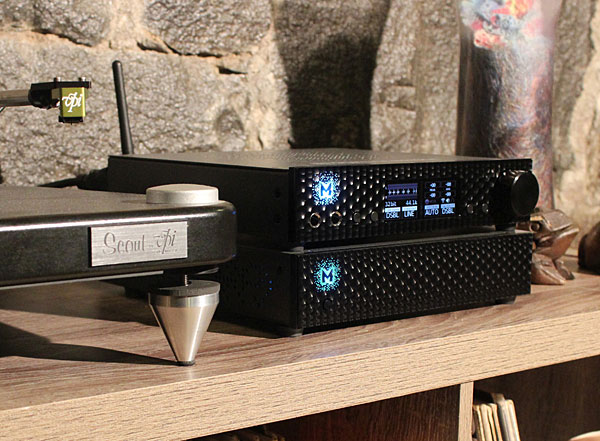 That Brooklyn sound
After several weeks of listening, I've got no disagreement with Mytek's claims that the Brooklyn Bridge has the same DAC inside as the Brooklyn DAC+. They both sound like pro DACs, which is a sort of oxymoron. Subjectively, they do have a sound, the most easily noticed characteristic being a crystalline purity to the highs that reminds me a little of my first exposure to CD so many years ago, allied not to the bright edginess that marked early CD but instead to a rich, deep fullness.
To say a DAC is pro is to say that it's designed for sonic transparency—that you could loop a piece of music through it (in a round trip with a similarly neutral companion ADC) several times without noticing any change in the sound. I asked Jim Anderson, the multiple Grammy-winning sound engineer, how this works in a sophisticated studio. Depending on the methods used, he told me, a digital recording may pass through a DAC between two and five times, with additional trips possible (likely through a different DAC) during mastering. Many audiophiles maintain that every component has a sound. I'm sure it's true: There's always some coloration. It may be obvious or very subtle. But if a DAC has an obvious sound of its own—a sound you can hear and consistently recognize in a single trip through the system—then, on several round trips, that sonic signature will be multiplied.
You say that expensive DAC gives your music a more solid foundation I bet it sounds great! But what will it sound like after four more passes? Designers of DACs intended for home systems don't need to worry about that. Designers of DACs used in studios do. Now consider the contrapositive: If several round trips don't color the sound excessively, then the DAC isn't altering the sound significantly on a single trip—which means that the DAC has essentially no sound of its own, or not enough to matter (footnote 3). That "sound" I'm hearing is the sound of DAC neutrality. It's what the rest of the system sounds like.
Now a corollary: If two different DACs can both make several round trips without significantly altering the sound, then it follows—necessarily, logically, incontrovertibly—that those two DACs sound essentially the same. If they sounded significantly different, their sounds would diverge radically after several passes.
The notion of neutrality is powerful in perfectionist audio; there's a reason people call this high fidelity. If you value fidelity above all, then, yes, a studio DAC is superior. But it isn't a moral issue. There is no right or wrong. Choose the DAC you love.
Otherwise, about the sound of the Mytek Brooklyn Bridge, I'll merely observe that via Wi-Fi, I think I heard a hint of brightness—something that could vary from one wireless context to another. It was subtle, and I wouldn't swear that what I thought I heard was real.
Summing up
The Brooklyn Bridge is the same Stereophile Class-A DAC I reviewed for the April 2018 issue of Stereophile—the Brooklyn DAC+—but with added Wi-Fi and Ethernet streaming and some modest but useful server capabilities. The streaming features work great with Roon (limited to 24 bits/192kHz in PCM and to DSD64), with an Ethernet wire or wireless. It streams Tidal and Qobuz with an assist from an iOS or Android app. It's easy to set up and use, even without instructions, but it doesn't offer the luxurious experience you'll get from a stand-alone server. It allows you to play audio files stored in the cloud or on local media, but it's choosy about which local drives it will read, preferring certain smallish flash drives—a problem that could be addressed with a firmware update, depending on ConversDigital, a third-party hardware provider that may not understand the issues, so it's hardly guaranteed.
The Brooklyn Bridge aspires to and approaches sonic neutrality. I hear a rich, detailed sound with fullness and depth but without exaggerated lows, and with a crystalline quality in the highs. There may be other streaming DACs on the market that achieve similar neutrality and sound as good, but this is the only streamer I'm aware of that incorporates a DAC used in studios. For the moment, the Brooklyn Bridge appears to have the class to itself.
Footnote 3: Astute readers may have noticed a flaw in this argument. In principle, colorations imparted by the DAC could be removed by the ADC, resulting in a neutral round trip. There's no reason to think this happens, though, and it's easy to test: Just pair the DAC with a different ADC.
To make a system like this work well, you need search capability. I had to look for a while to find Search within mConnect. It's there, but in a different place for each music-streaming app.
Think of mConnect Control, then—and the mConnect Player apps—as a wrapper: The streaming apps run inside mConnect Control. Inside the app, Tidal and Qobuz have pretty much the same features as when they run independently. The interface isn't elegant—there are, for example, two sets of favorites: your mConnect favorites and your Tidal or Qobuz favorites—but it works. If you want to get your Qobuz or Tidal out of your portable device and into a DAC without dedicating a computer to the task, this is how you do it.
I wanted to see how different the experience was with one of the paid mConnect Player apps, so I dropped $5.99 and downloaded the HD version, the one intended for iPads. Except for the horizontal orientation, I found the experience much the same as with the free Control. When you click on the Browser button inside mConnect Player—it works the same way in mConnect Control—you see other things besides streaming apps. You also see cloud services: Dropbox, OneDrive, iCloud Drive. You can, if you wish, stream your own music hosted in the cloud. Nifty.
You also see any local media on which music can be stored. I saw my iPad, a Western Digital My Cloud server I use to back up photographs, and something called Mytek Brooklyn Bridge HEM003650 Server. What's that, then?
That Brooklyn soundAfter several weeks of listening, I've got no disagreement with Mytek's claims that the Brooklyn Bridge has the same DAC inside as the Brooklyn DAC+. They both sound like pro DACs, which is a sort of oxymoron. Subjectively, they do have a sound, the most easily noticed characteristic being a crystalline purity to the highs that reminds me a little of my first exposure to CD so many years ago, allied not to the bright edginess that marked early CD but instead to a rich, deep fullness.
The Brooklyn Bridge is the same Stereophile Class-A DAC I reviewed for the April 2018 issue of Stereophile—the Brooklyn DAC+—but with added Wi-Fi and Ethernet streaming and some modest but useful server capabilities. The streaming features work great with Roon (limited to 24 bits/192kHz in PCM and to DSD64), with an Ethernet wire or wireless. It streams Tidal and Qobuz with an assist from an iOS or Android app. It's easy to set up and use, even without instructions, but it doesn't offer the luxurious experience you'll get from a stand-alone server. It allows you to play audio files stored in the cloud or on local media, but it's choosy about which local drives it will read, preferring certain smallish flash drives—a problem that could be addressed with a firmware update, depending on ConversDigital, a third-party hardware provider that may not understand the issues, so it's hardly guaranteed.
Footnote 3: Astute readers may have noticed a flaw in this argument. In principle, colorations imparted by the DAC could be removed by the ADC, resulting in a neutral round trip. There's no reason to think this happens, though, and it's easy to test: Just pair the DAC with a different ADC.