
Convergence is a widely used buzzword in today's consumer-electronics industry. However, other than using my PC's soundcard in the office to play back MP3-encoded music and plugging the Mac in my listening room into my reference system in order to experience Riven with the highest possible sound quality, I've kept a low profile in this area.  Part of my disdain for PC-based audio has been, until recently, the poor audio performance of soundcards. In addition, the inside of a computer, with all the RF flying around, is a hostile environment for audio. So when I laid eyes and ears on Yamaha's @PET RP-U100 personal receiver (which communicates with its host PC via a bidirectional USB datalink) playing back a video from the computer's DVD-ROM drive with spacious-sounding audio reproduction, I immediately requested a sample for review. The @PET RP-U100
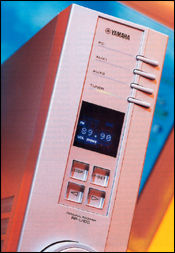
The $499 @PET (Personal Entertainment Theater with a preceding "@" to imply what? That the product is computer-savvy?) is a slim unit intended to stand alongside your computer monitor. Front-panel controls are minimal: four source buttons, four DSP buttons, and a large rotary volume control below the blue fluorescent display. But once the supplied software is installed on a PC running Windows 98, mouse-clicking on pulldown menus offers up to 208 radio-tuner presets in user-defined groups, a nine-band, ±6dB graphic equalizer, two degrees of signal compression as well as uncompressed, and six different DSP programs to enhance the sense of envelopment and spatial realism from just two speakers. (A "Thru" bypass mode is included for two-channel purists.) Yamaha ported nearfield-tweaked versions of their well-regarded Cinema DSP program from their top receivers to the RP-U100. These, called "Church," "Hall," "Jazz," etc., are based on modelings of actual venues renowned for their acoustic quality. By adding these reverberation signatures to the stereo information, subsequent psychoacoustic tweaking of the stereo channels fools the listener into experiencing, if not true surround, then at least a more spacious sound.
The sixth DSP program, labeled "Virtual Dolby Digital," is intriguing. When the RP-U100 detects Dolby Digital data on one of its digital inputs, it automatically switches from ordinary PCM to 5.1-channel mode. The GUI running on the computer allows the listener to adjust the various parameters, such as the apparent positions of the virtual rear speakers and the subwoofer balance, if one is used. When headphones are plugged into the front-panel jack, the RP-U100 switches to a program called "HP3D," intended to give a surround experience over headphones—I found this made the sound colored and phasey-sounding, however. Auralization
The Yamaha's virtual surround algorithms rely on psychoacoustic principles derived from binaural hearing analysis within the field of what is called "Spatial Hearing." Though an in-depth look at this exciting topic is beyond the scope of this review (footnote 1) a brief outline of a few key concepts should give you an idea of how these systems work.
Footnote 1: For an in-depth education in psychoacoustics, see Jens Blauert's Spatial Hearing: The Psychophysics of Human Sound Localization, Revised Edition, 1997, MIT Press, ISBN: BLATH 0-262-02413-6.
Part of my disdain for PC-based audio has been, until recently, the poor audio performance of soundcards. In addition, the inside of a computer, with all the RF flying around, is a hostile environment for audio. So when I laid eyes and ears on Yamaha's @PET RP-U100 personal receiver (which communicates with its host PC via a bidirectional USB datalink) playing back a video from the computer's DVD-ROM drive with spacious-sounding audio reproduction, I immediately requested a sample for review. The @PET RP-U100The $499 @PET (Personal Entertainment Theater with a preceding "@" to imply what? That the product is computer-savvy?) is a slim unit intended to stand alongside your computer monitor. Front-panel controls are minimal: four source buttons, four DSP buttons, and a large rotary volume control below the blue fluorescent display. But once the supplied software is installed on a PC running Windows 98, mouse-clicking on pulldown menus offers up to 208 radio-tuner presets in user-defined groups, a nine-band, ±6dB graphic equalizer, two degrees of signal compression as well as uncompressed, and six different DSP programs to enhance the sense of envelopment and spatial realism from just two speakers. (A "Thru" bypass mode is included for two-channel purists.) Yamaha ported nearfield-tweaked versions of their well-regarded Cinema DSP program from their top receivers to the RP-U100. These, called "Church," "Hall," "Jazz," etc., are based on modelings of actual venues renowned for their acoustic quality. By adding these reverberation signatures to the stereo information, subsequent psychoacoustic tweaking of the stereo channels fools the listener into experiencing, if not true surround, then at least a more spacious sound.
The Yamaha's virtual surround algorithms rely on psychoacoustic principles derived from binaural hearing analysis within the field of what is called "Spatial Hearing." Though an in-depth look at this exciting topic is beyond the scope of this review (footnote 1) a brief outline of a few key concepts should give you an idea of how these systems work.
Footnote 1: For an in-depth education in psychoacoustics, see Jens Blauert's Spatial Hearing: The Psychophysics of Human Sound Localization, Revised Edition, 1997, MIT Press, ISBN: BLATH 0-262-02413-6.