| Columns Retired Columns & Blogs |

Roku SoundBridge M1001 network music player
My interest in wireless network music players began during David Hyman's keynote speech at Home Entertainment 2003. Then CEO of Gracenote, Inc. (footnote 1), Hyman stunned me with his opinion that CDs and DVDs were already obsolete. Rather than pursue discs with greater storage capacity, Hyman urged industry designers to design music-server units with large hard drives to allow instantaneous access to any digital music track. With all of your music stored on a central hard drive, you could, within seconds, locate a specific track among thousands just by knowing the name of the artist, song, group, composer, year of recording, or even recording venue. Music mixes could be instantly grouped into playlists by the owner.
Footnote 1: Gracenote, Inc., is best known for operating the Music Recognition Service (MRS), a large online database. iTunes and other Internet music stores tap into MRS to automatically label downloads with artist, song title, and other information for users to apply when copying CDs to their personal computers. Gracenote's CD Trustee shareware program (available at www.base40.com) can automatically catalog, organize, and display an entire music collection if the user simply inserts each CD in turn in his computer's hard drive. Gracenote's Music Library 1.0 (www.wensoftware.com/MusicLibrary) is a shareware database application that allows a user to catalog and play music files and media stored on the user's home computer.
Hyman's 30-minute talk, while spellbinding, raised issues of feasibility that seemed insurmountable. Would audiophiles want to spend the time required to rip their favorite tracks to a computer's hard drive? And wouldn't a drive large enough to hold high-definition audio files be prohibitively expensive?
Only three years later, Hyman's dream has materialized. Hard-drive storage capacity per price point has jumped almost a hundredfold. Gracenote has become the international leader in digital media technology and services, providing complete management systems for digital media. There has been explosive growth in the number of online music vendors—iTunes.com, Rhapsody.com, Urge.com, and Napster.com, to name a few—that sell or rent downloadable music to music lovers.
Reflecting this sea change in music distribution, John Atkinson recently reviewed three network music players: the Apple Airport Express WiFi Hub ($129, May 2005, Vol.28 No.5), the Slim Devices Squeezebox ($299, September 2006, Vol.29 No.9), and the Sonos ZP80 Bundle ($999, October 2006, Vol.29 No.10). First, he centralized his extensive home library of digital music recordings on a Mac mini's hard drive, then wirelessly distributed digital music files to different rooms in his house over his wireless local area network (WiFi LAN). He could then use each player to wirelessly direct the streaming digital files from his hard drive to his high-end music system via a Mark Levinson No.30.6 D/A converter. John found the sound first-rate—he had to listen intently to hear any meaningful sonic differences between the networked music player's digital output fed to the outboard DAC and the digital output of an expensive CD player playing the original CD and feeding the same DAC.
Which brings me to the Roku SoundBridge M1001 network music player ($199.99). The SoundBridge can play downloaded music files that are protected by licensing software—Microsoft's Digital Rights Management (DRM), v.10, using Windows' Plays for Sure protocol. This seemed an excellent reason for me to buy a SoundBridge to play my own digital files.
Before we begin...
A network music player is not a music server (footnote 2). The primary job of a music server is to store digital music files and distribute them elsewhere. A music player facilitates the distant control of these files, using the owner's general-purpose WiFi network to wirelessly transport them from the music server's hard drive to an audio system. The WiFi network allows the player to be placed anywhere in the home.
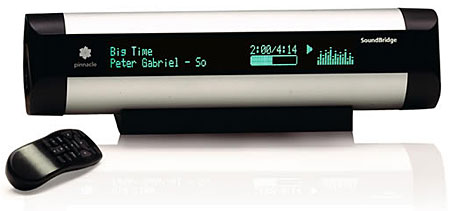
The SoundBridge M1001 depends either on iTunes or on free open-source software, such as Windows Media Connect or Slim Devices' SlimServer, running on the music-server computer. Once this server software is running, the SoundBridge has many functions. Its large fluorescent display shows track title, composer, album name, or even real-time spectral analysis.
Description
The SoundBridge M1001 comes in a blister pack, along with a well-written manual, a wall-wart power supply, a remote control (two AAA batteries are included), a 1/8" (3.5mm)-to-RCA cable, and a detachable rubber base to steady the cylindrical SoundBridge when it's placed on a flat surface. Its rear panel has a socket for an Ethernet cable, a separate area for a stereo line-level jack, an RCA jack for the S/PDIF coax, and a TosLink connector.
The player itself is a thin tube of black and silver anodized aluminum. Much of its front panel is taken up by a fluorescent 200x150-pixel display that runs almost the full 10" width of the player. The SoundBridge has both digital (coaxial and optical) and analog outputs. Its audio circuitry includes a proprietary 20-bit DAC to drive its analog output. Its S/PDIF and DAC clocks are driven by a 24.5297MHz crystal oscillator.
The SoundBridge handles most digital music formats, including MP3, AAC, AIF, WAV, ALC, Ogg-Vorbis, Windows Media, and FLAC. When your music-server software sends compressed music files to the SoundBridge, it decodes them in real time to PCM before sending them on to its DAC and S/PDIF outputs.
Why the SoundBridge Plays for Sure
Under its Plays for Sure protocol, and as explained on its website, Microsoft licenses to and permits distribution and playback of DRM-protected musical material by only two network music players—those made by Roku and D-Link. This means that the SoundBridge can play protected music files downloaded, for example, from Napster.com, Rhapsody.com, MSN_Music_Now.com, and WalMart.com. When you click on the protected song's title with the Roku's remote, the SoundBridge displays the message "Acquiring License," signifying that it is matching its code to that of the DRM-wrapped music file. That done, the player can then receive the protected file over a home network, though the file can be played in only one room at a time. (The Sonos system allows several players to play simultaneously.) The DRM-wrapped FairPlay AAC files downloaded from Apple's iTunes Store will not play, however.
Installing the SoundBridge
I initially installed the SoundBridge M1001 on my office desk, next to the laptop that serves as my music server. The SoundBridge has no physical user controls—it must be operated from its remote or from a computer via a WiFi or Ethernet connection. Setup was easy, and as I browsed my music library on my laptop, the SoundBridge displayed all of the album and song titles and artist names of music I'd ripped from my favorite CDs using Windows Media Player software.
Footnote 1: Gracenote, Inc., is best known for operating the Music Recognition Service (MRS), a large online database. iTunes and other Internet music stores tap into MRS to automatically label downloads with artist, song title, and other information for users to apply when copying CDs to their personal computers. Gracenote's CD Trustee shareware program (available at www.base40.com) can automatically catalog, organize, and display an entire music collection if the user simply inserts each CD in turn in his computer's hard drive. Gracenote's Music Library 1.0 (www.wensoftware.com/MusicLibrary) is a shareware database application that allows a user to catalog and play music files and media stored on the user's home computer.
Footnote 2: The Roku SoundBridge can't be called a music or media server because it lacks an internal hard drive to store music and/or video files, though its accompanying software distributes files to other components for playback. The owner of a digital music player must set up the files of his music library on his computer's hard drive. Alternatively, a separate external hard drive, or Network Attached Storage (NAS) drive—such as a Maxtor Shared Storage (Plus) or a Buffalo Linksys—can be used to store the music files. One attaches an NAS to the WiFi's router via an Ethernet cable. The drive's icon will then appear on the PC's screen whenever the owner pulls up the "My Network Places" page.
NEXT: Page 2 »
 | |||||||||||

|
|
| |||||||||
- Log in or register to post comments









| Loudspeakers Amplification Digital Sources | |
Analog Sources Accessories Featured | |
Music Columns Retired Columns | |
Show Reports | |
Features Latest News Community | |
Resources Subscriptions |
 © 2024 Stereophile
AVTech Media Americas Inc., USA
All rights reserved