| Columns Retired Columns & Blogs |

Sonos ZP80 & ZP100 WiFi Music System
Don't get the wrong idea. I don't watch trash TV. I am not interested in the doings of people who are famous merely for being famous. I was probably the last to realize that Paris Hilton was not the name of a French hotel. But the kitchen TV just happened be tuned to Channel 4 when I switched it on while I was preparing dinner. No, I do not watch NBC's Extra, but as I was reaching for the remote I was stopped in my tracks by what I saw. The show was doing a segment on the new L.A. home of Jessica Aguilera, or Christina Simpson, or . . . well, it doesn't matter. What does matter was the host's mention of all the cool stuff the bimbette had had installed in her new pied-à-terre: "...and a Sonos audio system, of course."
Footnote 1: It is possible to use a single Zone Player with an existing WiFi network to get around this problem, using an outboard WiFi bridge connected to the Zone Player via Ethernet, but the handbook warns about compatibility problems.
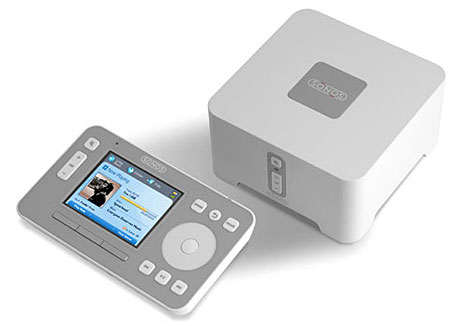
Sonos has obviously arrived. Any doubts I'd had about making the Santa Barbara–based company's new ZP80 and older ZP100 the subject of a Stereophile feature review, or about featuring the Sonos CR100 system controller on this issue's cover, disappeared. But I had already been given an inkling that this company was on an upward path when I visited a dealer last March and had seen a large stack of Sonos boxes in their custom-install warehouse. "Sonos is the easiest way of putting together a multiroom system," the dealer told me. "The stuff literally walks out of our door."
Media zervice
I have been writing about ways of implementing a media-server–based system for a while now, beginning with my May 2005 review of Apple's $129 Airport Express WiFi Hub, which, with its line-level and digital outputs, is still the cheapest, if not the easiest, way of feeding music around the home from files stored on a PC. But the Airport Express was supplemented by the $299 Slim Devices Squeezebox (see September 2006, p.128), which takes the level of audio performance up a notch, and allows direct control of the remote media server from the listening chair.
The Sonos system is more sophisticated than the Squeezebox in that it sets up its own proprietary, encrypted WiFi network, said to be optimized for streaming audio files rather than for making use of a general-purpose network. It can also dispense with the computer, working with a network storage hard drive (see Jon Iverson's sidebar, "Network-Attached Storage"). Most important, it moves the display from the processor to the remote. The Sonos CR100 controller's ($399) full-color, 3.5" LCD screen not only allows easy navigation of your music files on up to 16 network devices, it will also display all the metadata associated with each track, including the album-cover art, if you've stored that. This controller is one of the neatest consumer-electronics products I have encountered: it is sealed to prevent damage from liquid splashes; it has modes for both deep and shallow sleep, from which it can roused by being picked up; and as well as a motion sensor, it has a light detector so that its control buttons are automatically backlit when the ambient light drops below a preset threshold.
I had put off reviewing the Sonos system because the company's first product, the ZP100 Zone Player ($499), included a power amplifier—all the owner needed to add was a pair of speakers. As useful as this feature is for non-audiophiles, it didn't fit with my own vision for server integration: a unit with line-level and digital outputs that could be painlessly integrated with an existing high-end system. But when, in May, Sonos introduced its ZP80 ($349), which omits the amplifier, it was exactly the trigger I needed. I asked for a review sample.
Zone Players
I didn't get just the ZP80, but the company's ZP80 Bundle ($999), which comprises two ZP80s, a CR100 with charging cradle ($50), and a ZP100. While a Sonos system can be set up with a single ZP80, this means the host computer needs to be in the same room as the audio system, as there needs to be an wired Ethernet connection between it and the Zone Player (footnote 1) (or a wired connection between the ZP80 and a network drive; again, see sidebar, "Network-Attached Storage"). The beauty to me of a distributed-music system is that the noisy PC can be in a different room, and for that you need two ZP80s. The first acts as the WiFi hub, and can also be used to access the Internet for Rhapsody (PCs only) and other streaming services, as well as for Sonos' own software updates. The second ZP80 (and a third, a fourth, etc., as well as one or more ZP100s, up to a maximum of 32 players in all), as well as the CR100, all log on to the network created by the first ZP80.
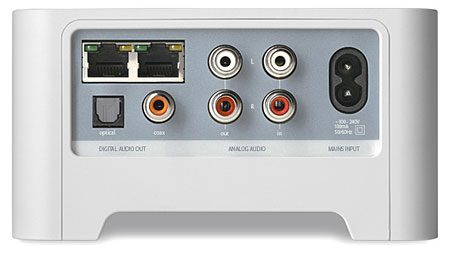
The ZP80 is a small, elegant plastic box with three buttons (for Mute and Volume Up/Down) and a white LED on its front; and, on its back, two Ethernet ports, a pair of RCA jacks for analog output, another pair of RCAs for analog input, and a pair of S/PDIF digital outputs, one on an RCA, the other on an optical TosLink jack. The ZP100 looks similar but is larger, is finished in darker gray with a perforated top panel, has the same buttons on the front and the same array of jacks on the back, with the addition of two pairs of heavy-duty, spring-loaded speaker terminals. The terminals are fed from a class-D amplifier section rated at 50Wpc into 8 ohms, this powered from a quite hefty toroidal transformer.
Zones
I set up one ZP80 in my basement test lab, which is where the Mac mini that houses my iTunes library resides, and connected it to the computer with an Ethernet cable. (Sonos players work with both Mac and Windows XP computers.) The second ZP80 went in my main listening room, connected to my Mark Levinson No.30.6 D/A processor with AudioQuest's OptiLink-5 TosLink optical link, and to one of the unbalanced pairs of inputs on the Mark Levinson No.326S preamp. The ZP100 went upstairs in the bedroom, driving my 1983-vintage Celestion SL6 speakers, which are usually driven by a Linn Classik receiver. The ZP100 had no problem being recognized by the Sonos network and playing back audio files without glitches, despite being two floors and many walls away from the server in the basement.
Once the Sonos Desktop Controller software had been installed on the Mac mini and was running, it recognized the three Zone Players, and each was initialized by my simultaneously pressing the front-panel Mute and Volume Up buttons. The Desktop Controller also searched the Mac mini for music files, finding and listing both the music in my iTunes Library and the other music files that are stored on the computer's hard drive. That, other than naming each Zone Player—"Den," "Media Room," "Master Bedroom," etc.—and setting the defaults for each, such as Fixed or Variable volume, was all it took to set up the distributed audio system. No messing about with IP addresses, passwords, or security settings. It couldn't have been easier (footnote 2).
One thing I really liked about the control interface was that while each zone's player can have different music playing, all selectable by the handheld controller even if you're not in the same room, it's possible to link two or more players—or, in what Sonos calls "Party Mode," all of them—so that they all play the same music in accurate synchronization. If, as I do, you have players set to different defaults—the listening-room ZP80 is set to Fixed output level, the bedroom ZP100 to Variable—the master volume buttons on the Controller affects only the applicable players.
Footnote 1: It is possible to use a single Zone Player with an existing WiFi network to get around this problem, using an outboard WiFi bridge connected to the Zone Player via Ethernet, but the handbook warns about compatibility problems.
Footnote 2: At the very end of the review period, the CR100 controller stopped working, apparently terminally. The LED turned red, indicating that it needed to be recharged, but after I'd connected it to the charger, it wouldn't turn on again. The manual states that the CR100 can be reset by holding down its Mute and Music buttons for at least three seconds or until it beeps, but this didn't help. Neither did resetting the Sonos Controller on the host computer. This turned to be due to a faulty battery. Sonos will replace faulty hardware under warranty by overnight "white glove" shipping.
NEXT: Page 2 »
 | |||||||||||

|
|
| |||||||||
- Log in or register to post comments





| Loudspeakers Amplification Digital Sources | |
Analog Sources Accessories Featured | |
Music Columns Retired Columns | |
Show Reports | |
Features Latest News Community | |
Resources Subscriptions |
 © 2024 Stereophile
AVTech Media Americas Inc., USA
All rights reserved